

In a video from the Amazon Show & Tell series about Bedrock AgentCore Memory, a slide included this sentence.
AI Agents are fundamentally stateless; we need stateful, Context-aware, helpful agents.
This was their way to explain the importance of memory to agents. After understanding the user’s goal, you need to provide the appropriate context to the Agent. This is where memory shines. Short-term memory for the current conversation and long-term memory for previously processed data, such as summaries, user preferences, and learned facts.
In this blog post, you learn about handling both types of memory through the AWS Java SDK.
Introduction to AgentCore Memory #
Before you can learn what AgentCore Memory is, you have to understand the different components of AgentCore.
AgentCore Runtime — The execution environment for your agent.
AgentCore Gateway — The entry point to tools and MCP servers for agents running in AgentCore Runtime.
AgentCore Identity — used to authenticate agents and assign an agent identity. It integrates through OAuth with different identity providers.
AgentCore Observability — Yes, you can observe the full AgentCore stack and make the agent run transparently.
Short-term memory #
The short-term memory is considered the conversational memory. You store your memory in a session, which is tied to an actor. The session can outlive, for instance, web sessions. You can even keep multiple session IDs to separate various conversations that you have. Another feature AgentCore Memory supports is branching. Within a session, your memory can use a tree-like structure to organise your conversations. Branching is out of scope for this blog.
Long-term memory #
The focus for long-term memory is to extract specific knowledge from the events. This can be summaries for particular topics, extracted facts, and user preferences.
Long-term memory is extracted using the provided strategies. You can also create your custom strategy.
This image is taken from the AWS workflow to create a new memory.

Long-term memory is typically stored in a vector store. The initialisation of the vector store takes some time; therefore, so does creating the long-term memory.
Introducing the Java SDK #
Java is clearly not a first-class citizen for Amazon Bedrock and AgentCore. Most examples use Python with the strong Strands Agent framework. However, with frameworks like Spring AI and a large number of Java practitioners getting involved, this is just a matter of time. The fun fact is, the Java SDK contains everything you need to work with AgentCore and AgentCore Memory.
You can find information about the project on GitHub:
GitHub - aws/aws-sdk-java-v2: The official AWS SDK for Java - Version 2
There is a website with SDK documentation. It was almost unusable; it completely blocks my machine. For some reason, the site required an incredible amount of memory. With a bit of patience, you can explore the different options the classes offer.
software.amazon.awssdk.services.bedrockagentcore (AWS SDK for Java - 2.40.8)
software.amazon.awssdk.services.bedrockagentcorecontrol (AWS SDK for Java - 2.40.8)
Adding required libraries to the project #
First, you can add the BOM so you don’t have to worry about dependency versions.
<dependencyManagement>
    <dependencies>
        <dependency>
            <groupId>software.amazon.awssdk</groupId>
            <artifactId>bom</artifactId>
            <version>2.40.8</version>
            <type>pom</type>
            <scope>import</scope>
        </dependency>
    </dependencies>
</dependencyManagement>
Next, we add libraries to authenticate with AWS. I prefer to use SSO. I am not going into details on how to configure this. By setting two environment variables on your machine, you are ready to go.
aws sso login
export AWS_PROFILE=default
export AWS_REGION=eu-west-1
The libraries required for SSO to work are:
<dependency>
    <groupId>software.amazon.awssdk</groupId>
    <artifactId>sso</artifactId>
</dependency>

<dependency>
    <groupId>software.amazon.awssdk</groupId>
    <artifactId>ssooidc</artifactId>
</dependency>
Next, we need two additional libraries. The first library is for setting up components, such as our Memory component. The second library handles the runtime use of these components, adding events to memory. This becomes clear when we start explaining the code.
<dependency>
    <groupId>software.amazon.awssdk</groupId>
    <artifactId>bedrockagentcorecontrol</artifactId>
</dependency>

<dependency>
    <groupId>software.amazon.awssdk</groupId>
    <artifactId>bedrockagentcore</artifactId>
</dependency>
Creating and using the short-term memory #
You start by creating a memory resource. You can think of this as a database for your application to store memory events.
For short-term memory, you must specify an expiration. This is the number of days that events are kept in memory. The default is 90; I changed this to 7 for the demo. Below is the code to create the memory resource.
private Memory createNewMemory() {
    try (BedrockAgentCoreControlClient build =
                 BedrockAgentCoreControlClient.builder().region(Region.EU_WEST_1).build()) {

        CreateMemoryRequest request = CreateMemoryRequest.builder()
                .name("jettro_demo_memory")
                .description("This memory component is used by the Jettro Bedrock Demo Application")
                .eventExpiryDuration(7) // in days
                .build();

        CreateMemoryResponse memory = build.createMemory(request);

        logger.info("Created new memory with id {}", memory.memory().id());
        return memory.memory();
    }
}
Note that we use the class BedrockAgentCoreControlClient. This class is from the control package that we discussed when setting up the SDK.
After running this code, the ID is written to the console through the logging system. However, you can also use the AWS console to view information about the Memory Resource you created.
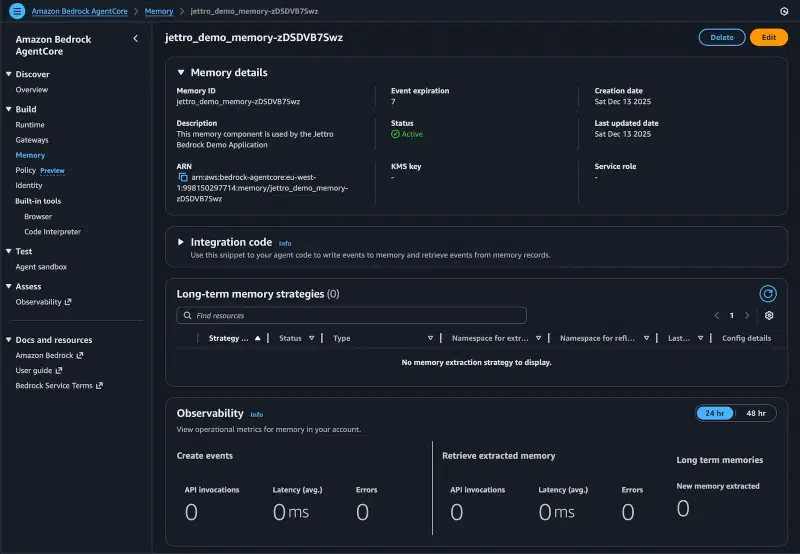
Loading the existing memory resource is easy with the identifier. Below is the code to load an existing resource.
private Memory loadExistingMemory(String identifier) {
    try (BedrockAgentCoreControlClient build =
                 BedrockAgentCoreControlClient.builder().region(Region.EU_WEST_1).build()) {

        GetMemoryRequest getRequest = GetMemoryRequest.builder()
                .memoryId(identifier)
                .build();

        Memory memory = build.getMemory(getRequest).memory();

        logger.info("Memory found: {}", memory.name());
        return memory;
    }

}
Add an event to the short-term memory. #
The AgentCore Memory is created for Agents. The primary way to interact with an Agent is through conversation. A conversation consists of a user message followed by an Agent response. Sometimes, tool outputs are also included in the conversation.
An event for the memory has some essential components.
- memoryId — The connection to the memory resource we want to use.
- sessionId — You can work with multiple sessions. A session can be reused and is always tightly coupled to the actor.
- actorId — Sessions are always stored for a specific actor and cannot be shared between actors.
- timestamp — The time the event is created.
- payload — The body of the event. In our case, this is part of the conversation.
Below is the code to create a new event and store it in memory. Notice that we now use the class BedrockAgentCoreClient.
try (BedrockAgentCoreClient build = BedrockAgentCoreClient.builder()
        .region(Region.EU_WEST_1)
        .build()) {

    Conversational userInput = Conversational.builder()
            .content(Content.fromText(request.prompt()))
            .role(Role.USER)
            .build();

    PayloadType payload = PayloadType.builder().conversational(userInput).build();

    CreateEventRequest buildRequest = CreateEventRequest.builder()
            .memoryId(memory.id())
            .sessionId(sessionId)
            .actorId(request.actorId())
            .payload(payload)
            .eventTimestamp(Instant.now())
            .build();

    CreateEventResponse event = build.createEvent(buildRequest);

    event.event().payload().forEach(i -> {
        if (i.conversational() != null) {
            logger.info("Stored conversational content in memory: {}", i.conversational().content().text());
        }
    });
}
Load events from the memory #
With the knowledge from the previous section, loading events from memory is straightforward.
private List<Event> loadEventsFromMemory(String actorId, String sessionId, BedrockAgentCoreClient client) {
    ListEventsRequest listRequest = ListEventsRequest.builder()
            .memoryId(memory.id())
            .actorId(actorId)
            .sessionId(sessionId)
            .build();

    ListEventsResponse response = client.listEvents(listRequest);

    response.events().forEach(event -> {
        event.payload().forEach(payload -> {
            if (payload.conversational() != null) {
                logger.info("Loaded conversational content from memory: {}", payload.conversational().content().text());
            }
        });
    });

    return response.events();
}
Working with memory and agents #
This is almost pseudo code. Most agent frameworks embed memory in their API. The example I am working on involves integrating AgentCore Runtime with Spring AI. For now, the sample handles memory management outside the agent call. Below is the code that stores the user message in memory. It fetches all the items from the memory. Next, it calls the agent with the user message and the messages from the memory. Finally, it stores the message from the agent in the assistant role.
@AgentCoreInvocation
public MyResponse handleUserPrompt(MyRequest request, AgentCoreContext context) {
    var sessionId = context.getHeader(AgentCoreHeaders.SESSION_ID);
    if (sessionId == null || sessionId.isBlank()) {
        sessionId = "session-" + memoryPropertiesConfig.sessionId() + "-" + request.actorId();
    }

    try (BedrockAgentCoreClient build = BedrockAgentCoreClient.builder()
            .region(Region.EU_WEST_1)
            .build()) {

        List<Event> events = loadEventsFromMemory(request.actorId(), sessionId, build);

        storeUserEvent(request, sessionId, build);

        String agentResponse = callAgent(request, events);

        storeAgentResponseEvent(agentResponse, request.actorId(), sessionId, build);

        return new MyResponse(agentResponse);
    }
}
Creating and using the short-term memory #
Creating long-term memory adds to short-term memory. It is not possible to have long-term memory without short-term memory. Events from short-term memory are used by extraction strategies in long-term memory.
Namespace #
All memory items are stored using a namespace. It is essential to include the actorId in the namespace to prevent one actor from accessing another actor’s memory. The default namespace for semantic memory is:
/strategies/{memoryStrategyId}/actors/{actorId}Create the memory resource #
Below is the code for creating the new memory, including long-term memory via the semantic extractor strategy.
private Memory createNewMemory() {
    try (BedrockAgentCoreControlClient build =
                 BedrockAgentCoreControlClient.builder().region(Region.EU_WEST_1).build()) {

        SemanticMemoryStrategyInput semanticStrategy = SemanticMemoryStrategyInput.builder()
                .name("jettro_demo_semantic_strategy")
                .description("Semantic memory strategy for Jettro Bedrock Demo Application")
                .build();

        MemoryStrategyInput memoryStrategyInput = MemoryStrategyInput.builder()
                .semanticMemoryStrategy(semanticStrategy)
                .build();

        CreateMemoryRequest request = CreateMemoryRequest.builder()
                .name("jettro_demo_memory")
                .description("This memory component is used by the Jettro Bedrock Demo Application")
                .eventExpiryDuration(7) // in days
                .memoryStrategies(memoryStrategyInput)
                .build();

        CreateMemoryResponse memory = build.createMemory(request);

        logger.info("Created new memory with id {}", memory.memory().id());
        return memory.memory();
    }
}
By now, you can have noticed the pattern in creating code for the AWS SDK. You need to find the input class and use its builder to create an instance. Note how the CreateMemoryRequest now includes the memory strategies.
Fetch items from long-term memory. #
Fetching items from long-term memory is performed via semantic search. You have to provide a query to fetch similar items. In an Agentic approach, the agent would analyse user input and formulate a semantic query. For now, we use the user input to create the semantic query. Below is the code to extract records from the long-term memory.
private List<String> retrieveEventsFromMemory(String query, String actorId, BedrockAgentCoreClient client) {
    var memoryStrategyId = this.memory.strategies().getFirst().strategyId();

    SearchCriteria searchCriteria = SearchCriteria.builder()
            .memoryStrategyId(memoryStrategyId)
            .searchQuery(query)
            .build();

    RetrieveMemoryRecordsRequest retrieveMemoryRecordsRequest = RetrieveMemoryRecordsRequest.builder()
            .memoryId(this.memory.id())
            .maxResults(4)
            .namespace("/strategies/" + memoryStrategyId + "/actors/" + actorId)
            .searchCriteria(searchCriteria)
            .build();
    RetrieveMemoryRecordsResponse retrieveMemoryRecordsResponse = client.retrieveMemoryRecords(retrieveMemoryRecordsRequest);

    if (!retrieveMemoryRecordsResponse.hasMemoryRecordSummaries()) {
        logger.info("No memory records found for query: {}", query);
        return List.of();
    }

    return retrieveMemoryRecordsResponse.memoryRecordSummaries().stream()
            .map(item -> {
                logger.info("Memory record content: {}", item.content().text());
                return item.content().text();
            })
            .toList();
}
We have been using a dummy Agent, but we need better content to add items to the long-term memory. Therefore, we create a basic agent through Spring AI. With this new agent, we can obtain an LLM response and store the user request and the assistant’s reaction in short-term memory. With the extractors, long-term memory is also created.
Creating an Agent with Spring AI #
Beware, the code below does not integrate AgentCore Memory with Spring AI, nor does it use AgentCore Runtime. This is only to understand how to interact with AgentCore Memory for short-term and long-term memory. At the moment, there is no focus on deploying the agent on AgentCore Runtime. This is the focus for a follow-up blog.
private String callAgent(MyRequest request, List<Event> events, List<String> memories) {
    List<Message> messages = convertAgentCoreMemoryEventToSpringAIMessages(events);
    if (messages.size() > 10) {
        messages = messages.subList(messages.size() - 10, messages.size());
    }

    String systemPrompt = "You are an intelligent assistant helping users with their queries. " +
            "Use the provided conversation history and relevant memories to inform your responses. " +
            "If you don't know the answer, respond with 'I don't know.'";
    if (!memories.isEmpty()) {
        StringBuilder memoryContext = new StringBuilder("Relevant memories:\n");
        for (String memory : memories) {
            memoryContext.append("- ").append(memory).append("\n");
        }
        systemPrompt += "\n" + memoryContext;
    }

    String content = chatClient
            .prompt()
            .system(systemPrompt)
            .user(request.prompt())
            .messages(messages.reversed()) // Ensure chronological order ir right
            .call()
            .content();
    logger.info("Agent response: {}", content);
    return content;
}
First, we convert the events from the short-term memory into Spring AI messages. Next, we write the system prompt. Notice that the system prompt includes the records from the long-term memory. This is not a best practice, but it works for now. Finally, we call the LLM running in Bedrock. All you need to do is configure the model and the region.
spring.ai.bedrock.aws.region=eu-west-1
spring.ai.bedrock.converse.chat.options.model=eu.amazon.nova-2-lite-v1:0
Running a few sample requests #
These are the requests and a trimmed-down version of the response. Not that the actorId and the sessionId are the same for the first two requests. In the third request, I lost my session, so I asked a question that required retrieving it from long-term memory. Remember that you do not have access to the same short-term memory in different sessions.
POST http://localhost:8080/invocations
Content-Type: application/json

{
  "prompt": "I want to go to Denmark with my Campervan. Is Denmark a good country to travel with a Campervan?",
  "actorId": "demo_user_1",
  "sessionId": "session_1"
}
Traveling to Denmark with a Campervan: Is It a Good Idea?
Denmark is an excellent country for Campervan travel! It offers a mix of scenic landscapes, well-developed infrastructure, and a strong culture of outdoor living — making it a fantastic destination for Campervan enthusiasts. Here’s a detailed breakdown of why Denmark is a great choice and what you can expect:
POST http://localhost:8080/invocations
Content-Type: application/json

{
  "prompt": "Great that sounds promising, can you give advise on the best time of year to visit Denmark with a Campervan?",
  "actorId": "demo_user_1",
  "sessionId": "session_1"
}
Best Time of Year to Visit Denmark with a Campervan
Denmark is a fantastic destination year-round, but the best time to visit with your campervan really depends on your preferences for weather, crowds, and costs. Here’s a breakdown of the pros and cons for each season:
Now we change the sessionId.
POST http://localhost:8080/invocations
Content-Type: application/json

{
  "prompt": "What country did we discuss traveling to with a Campervan?",
  "actorId": "demo_user_4",
  "sessionId": "session_2"
}
You mentioned that you own a campervan and want to travel to Denmark with it. So, the country we discussed traveling to with your campervan is Denmark.
The following lines are copied from the application log.
2025-12-14T17:23:23.653+01:00  INFO : Memory record content: The user owns a campervan.
2025-12-14T17:23:23.654+01:00  INFO : Memory record content: The user wants to travel to Denmark with their campervan.
2025-12-14T17:23:23.654+01:00  INFO : Retrieved 2 relevant memory records from memory.
Concluding #
If you made it this far, you have a good understanding of how to interact with AgentCore Memory. In the future, things will become a lot easier. Memory resources will be created using CDK or other automated infrastructure components. Spring AI will integrate its memory capabilities with AgentCore Memory. But at least now you know how it works.
Drop a comment if you have ideas, suggestions or questions. The current state of the code is available at this link. I will continue with this example, update it to reflect improvements in Spring AI, and focus on integrating it with the other AgentCore components.
https://github.com/jettro/amazon-agent-core-memory/tree/blog_memory
References #
A video by the Amazon Bedrock team: Anil Nadiminti, Mani Khanuja, Akarsha Sehwag.
Reference to the community-driven Spring AI project to integrate AgentCore.
GitHub - spring-ai-community/spring-ai-bedrock-agentcore: Spring Boot integrations for Amazon…