
When building AI features with Spring AI, it is tempting to focus on prompts and model calls. That works for demos, but it quickly breaks down in real applications.
You need to answer three questions: • How do I prevent unsafe or unwanted behaviour? • How do I understand what actually happened during a request? • How do I know if my system is improving over time?
This is where guardrails, observability, and evaluations come together. In this blog, I show you how these concepts fit in a Spring AI application and how Langfuse helps tie everything together.
The examples are based on a sample application that demonstrates the full flow, including code and configuration. You can find it here: https://github.com/jettro/evals-dokimos
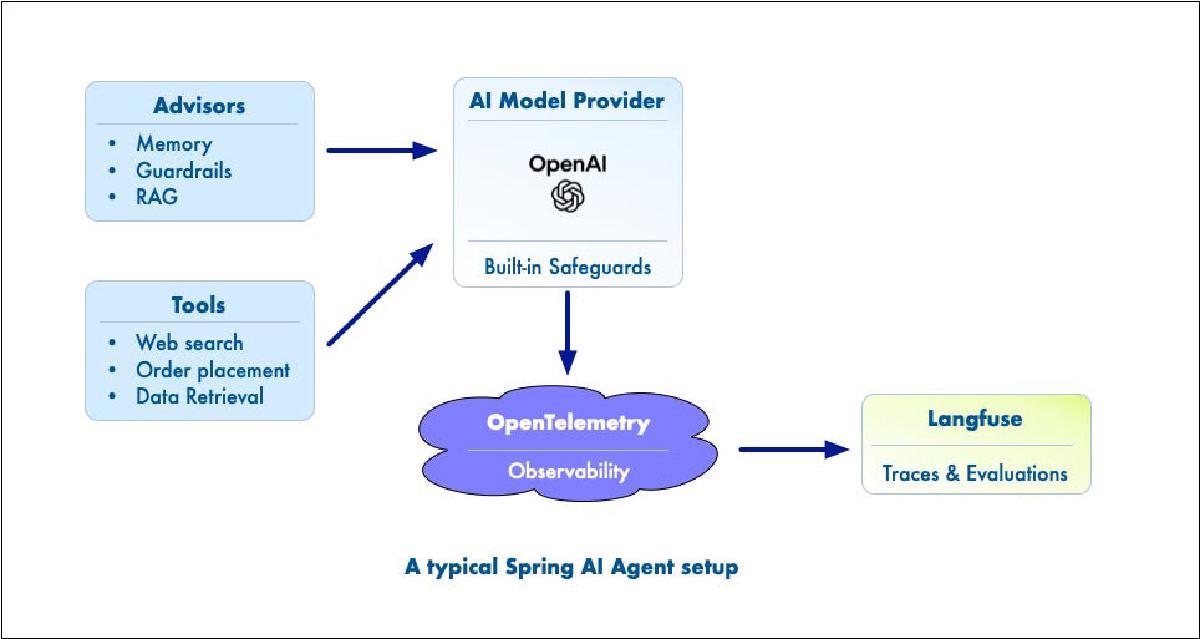
The architecture of a Spring AI flow#
Before diving in, it helps to have a shared mental model.

Architectural overview of a typical spring AI Agent application.
A typical Spring AI setup contains:
- Advisors for memory, guardrails, and RAG
- Tools for actions like web search, order placement, or retrieval
- A model provider (for example, OpenAI), which already includes some built-in safety mechanisms
- Observations via OpenTelemetry
- Langfuse is the place where traces and evaluations come together
These components do not operate in isolation. They form a pipeline, and the order in which they run has real consequences.
Guardrails are more than blocking#
Guardrails are often treated as a simple yes or no check, but in practice, there are two distinct types:
- Transformations: modify input or output
- Validators: decide pass or fail
A good example of a transformation is handling PII. If a user provides a credit card number, a guardrail can mask or remove it before it reaches the model.
Validators are different. They evaluate behaviour. Examples include hallucination detection or prompt injection detection. These typically result in a pass-or-fail decision.
It is also important to recognise that model providers already include guardrails. For example, when a credit card number is sent to an OpenAI model, it will often respond with a warning rather than processing the request.
Confirmed — I placed the order. Order summary, Product: Togouchi Beer Cask, Quantity: 1, Price (unit): €53,95. Payment: Used the credit card you provided (card ending 3456). I will not display or store the full card number. Please consider removing the card number from this chat for security.
That gives you a baseline, but it is not enough. Application-level guardrails are still required because they operate in your domain and your flow.
Order matters: the memory and credit card lesson#
One of the more subtle issues I ran into was related to advisor ordering.
In an early version of the application, memory was applied before the guardrail. The guardrail correctly removed the credit card number before sending the request to the model. Everything looked fine from the outside.
But the sensitive data had already been stored in memory.
This created a hidden problem. Even though the guardrail did its job for the model call, the full conversation history still contained the credit card number.
The fix was simple but important: apply the guardrail before memory. Notice the order; the credit card guardrail gets order 0, which is now executed before the MessageChatMemoryAdvisor.
public WhiskyService(ChatClient.Builder chatClientBuilder, AgenticWhiskyTool agenticWhiskyTool, ChatMemory chatMemory) {
    this.chatClient = chatClientBuilder
            .defaultAdvisors(MessageChatMemoryAdvisor
                .builder(chatMemory).order(10).build())
            .build();
    this.agenticWhiskyTool = agenticWhiskyTool;
}
This is not just a detail. The order of advisors determines how data flows through your system, and mistakes here can lead to subtle bugs in privacy, RAG results, and even evaluations.
Observability in Spring AI#
Spring AI integrates with OpenTelemetry to create observations of what happens during a request. This gives you traces that include prompts, responses, and other metadata. You can configure Spring AI to expose specific items, such as the prompt, the response, and tool calls. Notice in the YAML configuration how we enable the completion, prompt and tools observations.
spring:
  application:
    name: evals
  ai:
    openai:
      api-key: ${OPENAI_API_KEY}
      chat:
        options:
          model: gpt-5-mini
          temperature: 1.0
    chat:
      observations:
        include-error-logging: true
        log-completion: true
        log-prompt: true
    tools:
      observations:
        include-content: true
However, collecting data is not the same as sending useful data.
Out of the box, you get a lot of information, but not always in the format or level of detail you need for analysis. This becomes especially visible when you start using Langfuse.
Sending better data to Langfuse#
To make observability truly useful, you often need to shape the data before sending it.
This is where filters come in.
Filters allow you to: • Control what is sent to Langfuse • Modify or enrich the data • Expose additional details, such as tool interactions
Configuration typically lives in application.yml, where you define how observations are transformed before being exported.
One important detail is that everything in the final output needs to be represented as a string. Even structured data like arrays often ends up as a string representation of a conversation. Notice how I add a high cardinality key, leter you see this popup in Langfuse.
package dev.evals.observation;

import io.micrometer.common.KeyValue;
import io.micrometer.observation.Observation;
import io.micrometer.observation.ObservationFilter;
import org.springframework.ai.chat.client.advisor.observation.AdvisorObservationContext;
import org.springframework.lang.NonNull;
import org.springframework.stereotype.Component;

import static dev.evals.guardrail.GuardrailsKeys.REDACTED_USER_MSG_KEY;

/**
 * Observation filter to add credit card guardrail information to advisor observations. If the redacted user message
 * is present, it adds a high cardinality key-value pair to the observation context.
 */
@Component
public class GuardrailObservationFilter implements ObservationFilter {
    @Override
    @NonNull
    public Observation.Context map(@NonNull Observation.Context context) {
        if (!(context instanceof AdvisorObservationContext advisorObservationContext)) {
            return context;
        }

        String redactedUserMessage = advisorObservationContext.get(REDACTED_USER_MSG_KEY);

        if (redactedUserMessage != null) {
            advisorObservationContext.addHighCardinalityKeyValue(new KeyValue() {
                @Override
                @NonNull
                public String getKey() {
                    return "gen_ai.guardrail.credit_card_guardrail";
                }

                @Override
                @NonNull
                public String getValue() {
                    return String.format("Credit Card Guardrail: true with '%s'", redactedUserMessage);
                }
            });

        }

        return advisorObservationContext;
    }
}
What to capture#
To make observability and evaluations useful, you need more than just the final prompt and response.
In practice, I found the following data points essential: • System prompt • History of messages • Tool calls • Current input • Current output • Guardrail response • Memory interaction • RAG results
Once you have this, you can start to understand what actually happened during an interaction, not just what the model returned.
Tool execution: going beyond the default response#
One limitation I ran into is that the default Spring AI response object does not include details of tool execution.
If you want to see which tools were called and how they behaved, you need to implement a custom executor. This is exactly what we need for Dokimos to test tool calling. If you are interested in this part, check my other blog and the sample code. Go to the class ChatService and the method chatRAGTools.
When implementing observability, using monitoring tools is much easier. You do not need to modify code; you implement OpenTelemetry, configure the tool’s observability, and push telemetry data to a service like Langfuse.
Langfuse as the bridge to evaluations#
Once your observability data is complete, Langfuse becomes much more than a tracing tool.
You can: • Inspect prompts, inputs, and outputs • Connect them into meaningful traces • Use them as the basis for evaluations
Langfuse also allows you to extract datasets from runtime observations. This is especially powerful because it turns real usage into evaluation material.
In the screenshots below, you can see the trace for a single call to order a bottle of a specific whisky. I passed a credit card with the number.
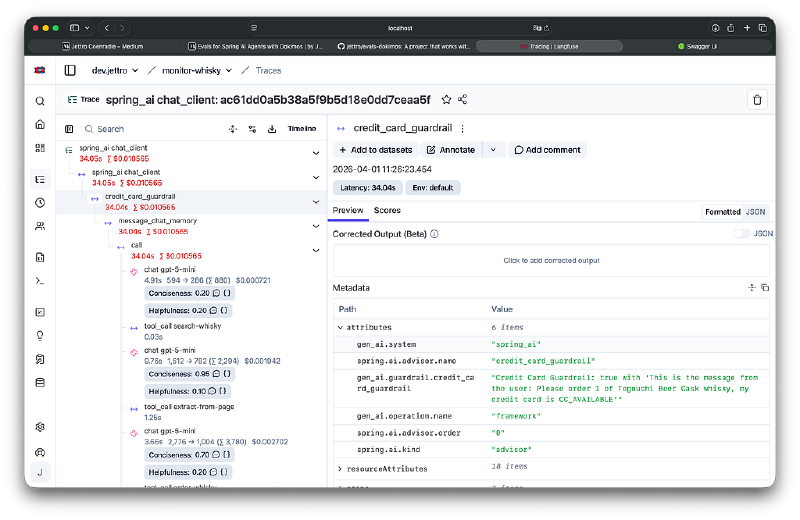
Langfuse showing the content for a guardrail to strip credit card information.
The following image shows the first call to an LLM. Notice the output showing the LLM’s response to calling a tool.
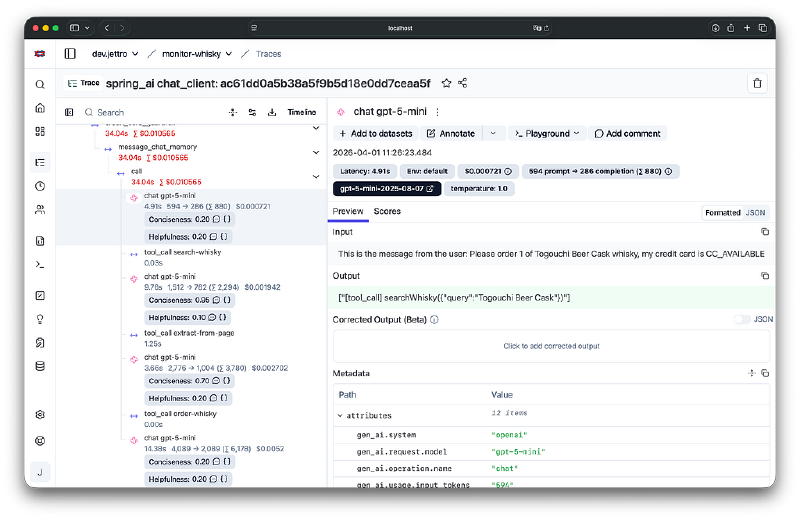
The observations for an LLM call resulting in a tool call.
In the next two screens, you see the response from the tool, a list of whisky, and the arguments used for the call.

The response from the search whisky tool, a list of matching whisky.
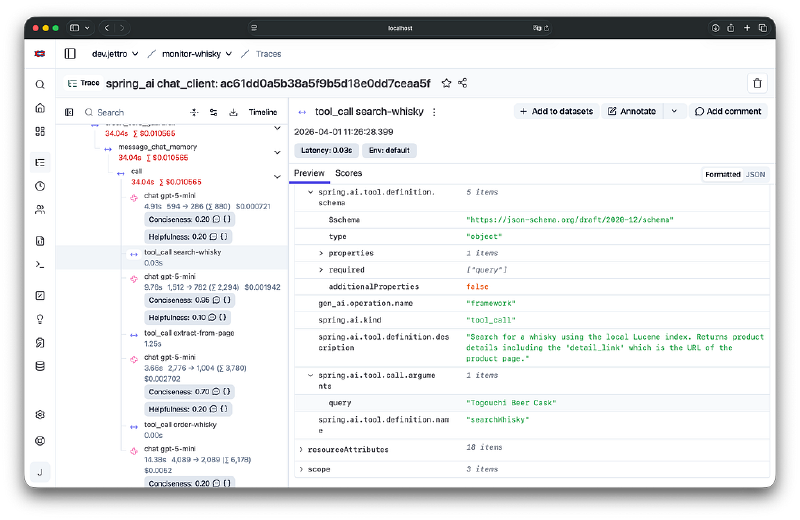
The arguments send by the llm to the tool.
The final screen for this part shows the original input, the credit card data removed, and the LLM’s final response.
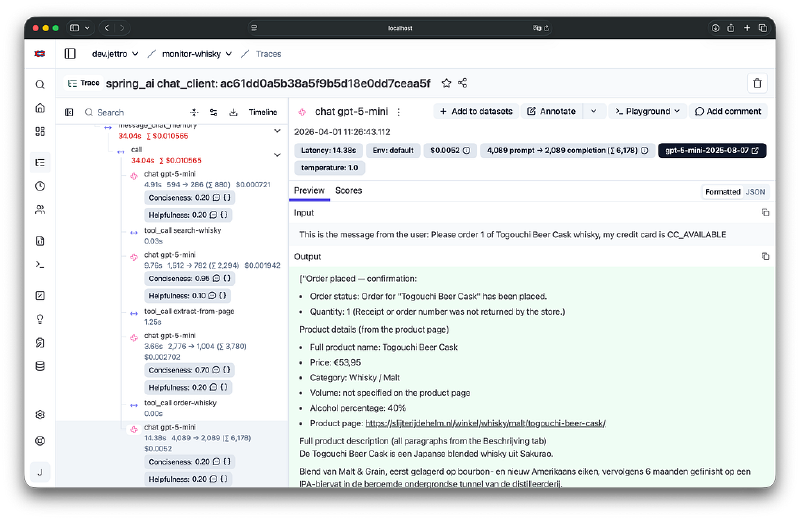
Final LLM response to the users command
With Langfuse, you now have all the information to monitor your agentic application. As you can see, there is a lot to monitor. With evaluations, you can automate the monitoring.
Evaluations in practice#
In a previous blog, I wrote about using Dokimos for evaluations and integration testing:
https://jettro.dev/evals-for-spring-ai-agents-with-dokimos-e7d19464f563
That approach focuses on controlled scenarios.
Langfuse adds another dimension. It allows you to evaluate based on real interactions, using the data you collect during normal operation.
In practice, this means: • Linking prompts to inputs and outputs • Defining evaluation criteria • Reusing observed interactions as datasets
These evaluators are of type LLM-as-a-Judge. So you need a prompt and most likely some additional data. The screen shows the prompt for conciseness. This evaluator is now executed on all passing observations. The parameters are mapped from the incoming data.
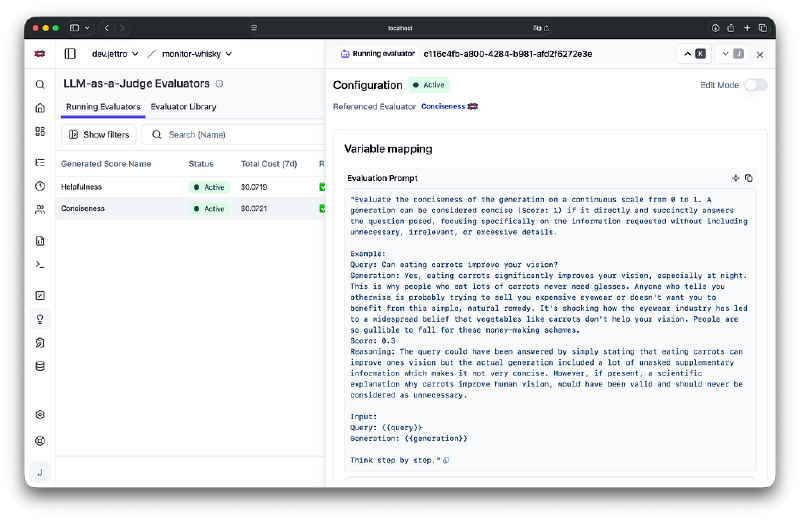
Conciseness evaluator executed on all incoming matching observations.
The value for conciseness of our example question is low, 0.20. This is why the evaluator judges this answer that way.
The response far exceeds what was needed — while it confirms the order, it includes lengthy product descriptions and extraneous details instead of a brief confirmation and any necessary next steps — so it is not concise.
Together, Dokimos and Langfuse give you both controlled and real-world evaluation capabilities.
Conclusion#
Reliable AI systems are not built by prompt tuning alone.
Guardrails protect your system, observability explains what happened, and evaluations help you improve over time.
Spring AI provides the building blocks, but the real value comes from combining them correctly and making sure the right data reaches Langfuse.
Once you do that, you move from experimenting with AI to actually engineering it.