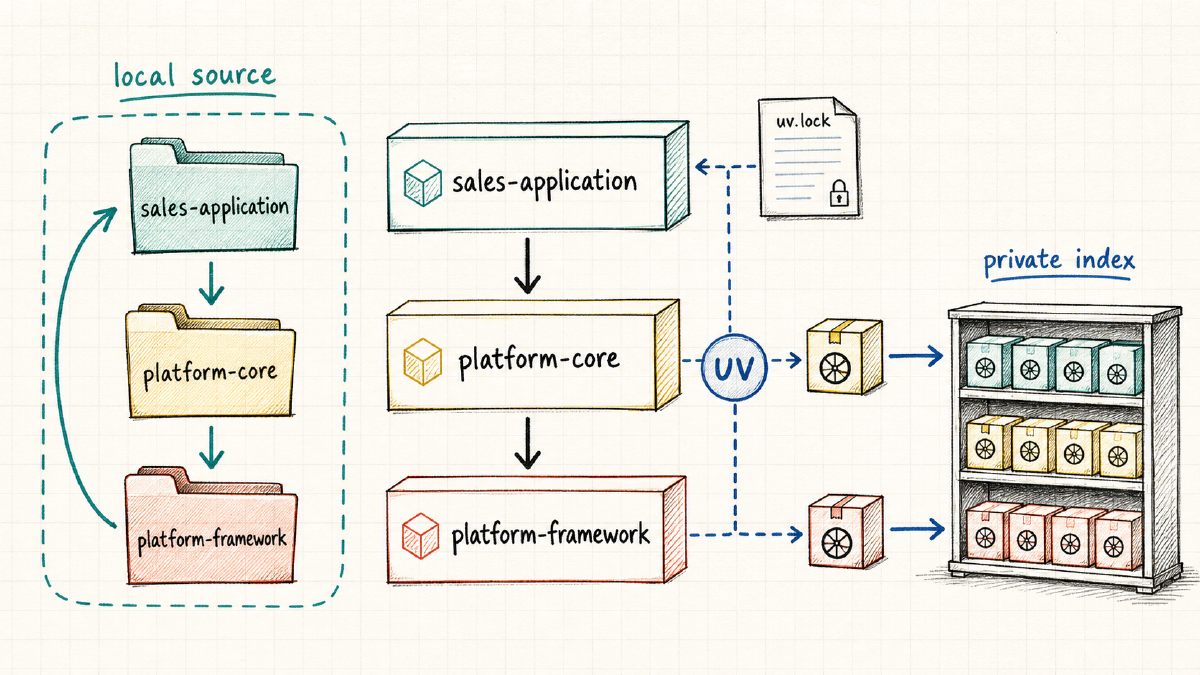

In How I’m Structuring Larger Python Projects with uv, I described the problem I was trying to solve. My work regularly crosses an application, a shared core, and an internal framework. I wanted released packages to remain the normal way of working while still being able to switch to local source code when a change crossed repository boundaries.
That article focused on the architectural choices. I deliberately stopped before showing the complete repository structure and all the supporting files needed to make the workflow practical.
Since then, I have built a working example. It does not combine everything into one large workspace. Instead, it consists of three independent uv workspaces containing seven packages, supported by a coordination repository, a local package index, explicit source switching, and reproducible Docker builds.
This article explains what each part contributes and why it exists. We will look at the package dependency graph, the different types of pyproject.toml, the responsibilities of uv, Make, Git, the package index, Docker, and Docker Bake, and the difference between source-based development and building an immutable image.
After establishing that foundation, I will follow one feature from platform-framework through platform-core and into sales-application. The focus is on understanding the boundaries and transitions. The complete commands remain available in the project README.
From an Architectural Idea to a Working Example#
The first article introduced three project names:
platform-frameworkcontains reusable technical building blocks.platform-coreadds shared domain and platform capabilities.sales-applicationuses those capabilities to solve a concrete business problem.
The working example adds a fourth repository around them: python-multi-project-setup. This coordination repository checks out the other repositories, starts the local package index, selects dependency sources, builds packages in dependency order, and creates Docker images.
It is important that this fourth repository is not another uv workspace. It coordinates the system, but it does not own the Python dependency graph. Each source repository remains responsible for its own packages, releases, environment, and lock files.
python-multi-project-setup/
|-- platform-framework/   # independent Git repository and uv workspace
|-- platform-core/        # independent Git repository and uv workspace
|-- sales-application/    # independent Git repository and uv workspace
|-- local-pypi/
|-- docker-bake.hcl
`-- Makefile
This separation is more than directory organisation. It preserves three different lifecycles. The framework can serve several core platforms, a core platform can support several applications, and an application can be deployed without releasing every upstream repository at the same time.
Three Workspaces and Seven Packages#
Each source repository is a uv workspace. Inside a workspace, packages are maintained together and resolved into one lock file. Across repository boundaries, released wheels remain the default integration mechanism.
The Framework Workspace#
The framework contains three packages:
framework-coreprovides foundational primitives such as entities, results, settings, repositories, and events. It has no dependency on the business domain or infrastructure.framework-infraprovides infrastructure implementations, including in-memory and JSON repositories. It depends onframework-core.framework-evaluationcontains reusable test factories and contract suites. It depends onframework-core, but it is intended to support development and evaluation rather than application runtime behaviour.
The split keeps the foundation small. An application can use the framework abstractions without automatically pulling in every infrastructure or test utility.
The Core Workspace#
The core repository contains two packages:
core-domaincontains shared domain concepts, such as products and money. It depends only onframework-core.core-servicesbuilds services on top of the domain and uses infrastructure abstractions and implementations. It depends oncore-domain,framework-core, andframework-infra.
This is where reusable technical concepts become shared business capabilities. The core knows about the framework, but the framework never knows about the core.
The Sales Workspace#
The application also contains two packages:
sales-backendcontains the sales-specific application and domain behaviour. It uses the core packages and selected framework packages.sales-apiexposes the application through FastAPI and provides the executablesales-apientry point. It depends onsales-backend, but the backend does not depend on the API.
The API is the composition and delivery boundary. The business behaviour remains usable without requiring FastAPI, Uvicorn, or HTTP-specific code.
Following the Package Dependency Graph#
Repository names provide only a high-level picture. The package dependencies show where a change can actually travel. In the following overview, an arrow points from a package to one of its direct dependencies.
sales-api
`-- sales-backend
    |-- core-domain
    |   `-- framework-core
    |-- core-services
    |   |-- core-domain
    |   |-- framework-core
    |   `-- framework-infra
    |       `-- framework-core
    |-- framework-core
    `-- framework-infra

framework-evaluation
`-- framework-core
There is some deliberate repetition in the declared dependencies. For example, sales-backend directly uses types from framework packages as well as from core packages. It therefore declares those dependencies explicitly instead of relying on them being installed transitively by core-services.
That rule matters in larger projects: a package should declare what it imports. A dependency is not owned by whichever package happens to bring it into the environment today.
The Boundaries I Want to Preserve#
The example contains several boundaries that look similar at first, but serve different purposes.
| Boundary | What it controls |
|---|---|
| Package | Portable metadata, imports, and the wheel that can be published |
| Workspace | Packages developed and resolved together inside one repository |
| Repository | Source ownership, version history, release cycle, and access control |
| Source mode | Which released dependencies are temporarily replaced by editable source |
| Lock file | One exact resolution for one source mode |
| Docker image | The immutable application artifact that is deployed |
A workspace is not automatically a repository strategy, and a repository is not automatically a deployment unit. The framework workspace produces three wheels. The sales workspace contains two packages but produces one application image. Keeping those distinctions explicit is one of the main goals of the setup.
Giving Every Tool One Responsibility#
The complete workflow uses several tools. The setup becomes easier to understand when each tool has a narrow responsibility.
| Tool | Responsibility |
|---|---|
| uv | Resolve dependencies, manage workspaces and environments, create locks, build wheels, and publish packages |
pyproject.toml | Describe packages, workspace membership, indexes, and selected source policy |
| Hatchling | Turn each publishable package into a wheel and source distribution |
| Make | Provide stable workflow entry points, invoke guarded source switching, and coordinate repositories in dependency order |
| Git | Store source history and identify an exact unreleased revision when needed |
| Package index | Distribute released, versioned wheels |
| Docker | Build the final runtime filesystem and process boundary |
| Docker Bake | Select an image source mode and provide contexts, secrets, labels, and tags |
| CI | Validate locks, source policies, tests, wheels, images, and publication rules |
Make does not resolve Python dependencies, and uv does not decide the organisation-wide release process. Docker should not repair an incomplete Python package definition, and Git should not become an accidental replacement for a package index.
This also explains why the Makefiles are useful even though most targets eventually call uv or Docker. They give developers one stable vocabulary while keeping the detailed command lines close to the repositories that own them.
Why the Example Needs Twelve pyproject.toml Files#
The first version of the example contained sixteen pyproject.toml files. Four of them were separate development projects for selecting editable source. Although that model was reproducible, it gave the IDE several project roots and locks to understand. The abstraction became more expensive than the problem it solved.
The simplified example contains twelve pyproject.toml files:
- Seven package manifests describe the seven publishable Python packages.
- Three workspace roots describe the packages developed together in each repository.
- Two Docker manifests describe Git and local-checkout image inputs.
The sales release image does not need another manifest. It uses the root sales-application/pyproject.toml and its lock file, which are also the defaults for normal application development. Editable development modes now update a bounded section of that root manifest instead of selecting another project.
This trades additional project files for visible local changes. Selecting editable source modifies the tracked root manifest and lock. The release configuration remains the canonical committed state, and the tooling makes returning to it explicit.
Package Manifests Describe Portable Dependencies#
A package-level pyproject.toml should describe the package independently of a checkout layout. The core-services package is a good example:
[project]
name = "core-services"
version = "0.1.0"
requires-python = ">=3.12"
dependencies = [
    "core-domain>=0.1,<1",
    "framework-core>=0.1,<1",
    "framework-infra>=0.1,<1",
]

[build-system]
requires = ["hatchling"]
build-backend = "hatchling.build"

[tool.hatch.build.targets.wheel]
packages = ["src/core_services"]
The manifest contains package names and version ranges, but no relative paths and no local index URL. It can be built into a wheel, published, installed from an index, or resolved from a Git subdirectory without changing its dependency contract.
This is also where an external library belongs. If sales-api imports an environment loader, that dependency belongs in the sales-api manifest. If sales-backend directly uses a structured logging API, it belongs in the backend manifest. The workspace root is not a bucket for dependencies that have no clear owner.
Workspace Roots Describe Repository-Local Development#
The root manifest connects packages that live in the same repository. The core workspace looks like this:
[tool.uv.workspace]
members = [
    "packages/core-domain",
    "packages/core-services",
]

[tool.uv.sources]
core-domain = { workspace = true }
core-services = { workspace = true }
framework-core = { index = "local" }
framework-infra = { index = "local" }

[[tool.uv.index]]
name = "local"
url = "http://localhost:8080/simple/"
explicit = true
The two core packages are editable workspace members. The two framework packages come from the package index by default. The individual package manifests remain portable because this uv-specific source policy lives at the workspace root.
The explicit index is another useful boundary. Internal packages assigned to it are not resolved from any other configured index. Credentials are provided outside the manifest through uv’s named-index environment variables.
A Managed Source Block Makes Selection Explicit#
The normal sales manifest resolves all four upstream packages from the package index. Source development changes only the marked [tool.uv.sources] block in that same root file.
The familiar commands still expose four source modes:
coreuses editable core packages and released framework packages.frameworkuses released core packages and editable framework packages.alluses editable core and framework packages.releaserestores all upstream packages to the index.
The presence of a sibling repository does not select a mode automatically. A small Python script owns a generated section with strict start and end markers:
# BEGIN GENERATED DEVELOPMENT SOURCES
[tool.uv.sources]
sales-api = { workspace = true }
sales-backend = { workspace = true }
core-domain = { path = "../platform-core/packages/core-domain", editable = true }
core-services = { path = "../platform-core/packages/core-services", editable = true }
framework-core = { index = "local" }
framework-infra = { index = "local" }
# END GENERATED DEVELOPMENT SOURCES
The selector refuses to edit the file when the markers are missing or duplicated. It also checks that the required sibling repositories exist, writes the selected source mappings, runs uv lock, and synchronizes the root environment.
The manifest-and-lock transition is transactional. If locking or synchronization fails, the script restores the previous manifest and lock. The selected mode is derived from the actual source table, so no separate marker can drift away from the dependency configuration.
platform-core uses the same design on a smaller scale: release mode consumes framework wheels, while framework mode replaces them with editable framework source.
One Manifest, One Lock, and One Environment#
Each repository now presents one root manifest, one root lock, and one root .venv to the IDE. The interpreter path does not change when switching from released packages to core source or to all source. Only the managed source block, resolved lock entries, and editable installations change.
This simplification makes PyCharm much easier to configure. There are no profile projects, additional interpreters, or profile-specific IDE modules. uv commands launched from the workspace also see the same active manifest that the IDE sees.
The trade-off is visible in Git: editable modes intentionally modify pyproject.toml and uv.lock. Before committing, pulling, or building a release image, I return to dev-release. The aggregate Git status command reports the active source mode alongside the modified files.
Release guards make this more than a convention. Repository lock checks and the release Docker build reject editable sources. Refreshing the release lock requires the release manifest and regenerates the lock from that canonical source configuration.
Lock Files Belong to a Source Mode#
The repositories now contain five lock files. Framework has one workspace lock, core has one workspace lock, and sales has one root lock plus two Docker-mode locks for Git and local source.
uv records source identity in uv.lock. A package resolved from an index, an editable path, an exact Git revision, and a non-editable local directory are not four spellings of the same locked input. They are different inputs and require different lock entries.
For host development, the root lock changes when the source selector changes mode. Only the release form of that lock is committed. This reduces the number of projects the IDE must understand, at the cost of requiring developers to restore release mode before sharing changes.
Docker keeps separate committed locks where the source identity is itself part of the image contract. The five locks answer these questions:
- What does the framework workspace resolve for its packages?
- What does the core workspace resolve in its current root mode?
- What does sales development and the release image install?
- What does an image install from exact Git commits?
- What does an image install from the current local checkouts?
The image locks are never generated inside a Docker build. They are refreshed before the build, validated against their manifests, and consumed with uv sync --locked.
Release-First Development#
The default workflow uses released framework and core wheels. A sales developer can work with only the sales repository checked out, synchronize the environment, run tests, and start the API.
This is the most important default in the example. Local source is powerful, but making it automatic creates invisible coupling. A directory left over from yesterday can change imports. CI may resolve a different graph from a developer machine. An application test may pass against code that has never been built into a wheel.
Release-first development keeps ordinary work close to production. The explicit source modes remain available for the smaller number of changes that actually cross a repository boundary.
The Local Package Index Represents the Release Contract#
The example uses an authenticated pypiserver container as a small local package index. Framework wheels are built and published first, followed by core wheels. Sales then resolves those released artifacts in the same way that it would resolve packages from a company registry.
The local server is intentionally a teaching tool. It uses HTTP on localhost, Basic authentication, and permits overwriting a version to keep the experiment manageable. None of those choices should be copied directly to production.
A production index should use HTTPS, managed and rotated credentials, immutable versions, and controlled publication. The useful lesson from the local server is the contract, not the server product: published wheels are the normal boundary between independently released repositories.
The IDE and uv are separate clients of that index. Adding Basic HTTP credentials to PyCharm or IntelliJ enables its package browser, but those credentials are not necessarily passed to uv when the IDE starts a synchronization. For this local demonstration, the README explains how to provide the same credentials through a protected ~/.netrc file. They never belong in pyproject.toml, uv.lock, an index URL, or committed IDE configuration.
Host Development and Docker Development Are Different#
Editable packages make sense on a developer machine. A file change should be visible immediately, and the debugger should step into the neighbouring source tree. A deployment image has different requirements.
Even the local Docker mode installs non-editable package snapshots. All image modes run the equivalent of:
uv sync --locked --no-dev --no-editableThe completed virtual environment is copied into a small runtime stage. The source repositories, uv cache, build credentials, test tools, and build system do not become part of the final image. The application runs as an unprivileged user and starts through the sales-api console entry point declared by the package.
This distinction is deliberate. A local image is not a development server packaged inside a container. It is a deployment-shaped artifact built from local source.
Three Ways to Build the Same Application Image#
The Docker setup supports three source modes. They differ in where upstream packages come from, but they produce the same runtime structure.
Release Mode#
Release mode uses the normal sales manifest and lock. It installs the four upstream packages from the authenticated package index. BuildKit mounts the username and password as secrets for the one build step that needs them.
The credentials are not Docker build arguments, persistent environment variables, lock-file content, or image labels. The local index address needs a small translation because localhost inside the builder is not the host machine, but that does not change the locked package versions.
This is the mode that most closely represents a production build using a private company registry.
Git Mode#
Git mode installs the core and framework packages from full commit hashes. Each source also identifies the package subdirectory inside its multi-package repository.
Moving branches and short revisions are rejected. A full hash makes the input reproducible and ensures all packages from one repository use the same revision.
The Git manifest also includes static dependency metadata for the external packages. That lets uv resolve packages from repository subdirectories without applying the development-oriented source mappings from those repositories’ workspace roots.
Git mode is useful for integration testing an unreleased revision. It is not the preferred long-term distribution mechanism for released internal packages.
Local Mode#
Local mode builds from the current sibling checkouts. Docker Bake supplies platform-core and platform-framework as named BuildKit contexts, so the sales repository can remain the primary build context.
The Dockerfile copies only the package directories it needs. The local manifest resolves them as non-editable paths and synchronizes a committed local-mode lock.
This mode answers a specific question: can the source currently present in all three repositories produce a deployment-shaped image? It is a stronger test than running against editables, but it still does not replace testing released wheels.
Docker Bake Makes the Source Mode Visible#
Docker Bake gives the three image modes named targets: release, git, and local. It also owns the details that do not belong in Python metadata, including named build contexts, secret mounts, image tags, Git revision labels, and lock checksums.
This provides one build interface while preserving three explicit inputs. It also makes it possible for validation scripts and CI to inspect the mode before building instead of inferring it from a long list of Docker arguments.
The resulting image contains labels for the application revision, source mode, and lock checksum. Those labels do not replace an external software bill of materials, but they make a locally built artifact easier to trace.
Validating Policy, Not Only Syntax#
uv lock --check can tell us whether a lock matches a manifest. It cannot tell us whether a release lock accidentally contains a path source or whether two packages from the same Git repository use different commits.
The coordination repository therefore adds policy validation around uv. The checks reject unexpected source kinds, editable external packages in image locks, moving Git references, incomplete commit hashes, inconsistent repository revisions, missing sales workspace packages, stale locks, and credentials embedded in source URLs.
The Docker smoke tests add another layer. They verify imports, confirm that the process does not run as root, start the API, and exercise its health endpoint. The important point is not the number of scripts. It is that each boundary has a test that matches its responsibility.
Following a Feature Through the Three Repositories#
The theory becomes useful when a feature starts in the framework and must travel through the core into the sales application. This walkthrough will switch the root source mappings to keep the feedback loop short, then return to the canonical release configuration before building the final image.
Unless stated otherwise, I run the commands from the python-multi-project-setup coordination repository. Before starting the feature, I need all three source repositories and the local package index:
make checkout-all
make pypi-init-auth  # only needed the first time
make pypi-start
make git-status
make git-status gives me a useful baseline. It shows the branch and local changes in every repository, together with the active source mode for core and sales.
Step 1: Add the Capability to the Framework#
The first step is deciding whether the capability belongs in framework-core or framework-infra. The package that owns the abstraction should not become dependent on a consumer just because that consumer motivated the change.
I synchronize the framework workspace before making the change. After adding the implementation and its tests, I run the complete framework test suite and verify its lock:
make -C platform-framework sync

# Implement the framework feature and its tests.

make -C platform-framework test
make -C platform-framework check-lock
Step 2: Use Framework Source from the Core#
Before publishing anything, the core workspace can select editable framework source. This proves that the framework API is usable by its first downstream consumer without creating an experimental wheel after every edit.
make -C platform-core dev-framework
make -C platform-core dev-status
make -C platform-core test
The first command rewrites the managed source block in platform-core/pyproject.toml, refreshes platform-core/uv.lock, and synchronizes platform-core/.venv. The status command should report framework, and imports of framework-core and framework-infra should now come from the sibling framework checkout.
Step 3: Expose the Capability Through the Core#
The core should translate the generic framework capability into something meaningful for applications. This is also the point where the dependency belongs in a package manifest rather than only in the generated source block.
The framework source remains editable while I implement and test the core change:
# Implement the core-domain or core-services change and its tests.

make -C platform-core test
make -C platform-core check-lock
There is no intermediate framework wheel yet. A change in platform-framework is immediately available to the core environment, while the core package metadata continues to describe the portable versioned dependency.
Step 4: Validate Everything in the Sales Application#
The all-source mode connects sales, core, and framework without merging their workspaces. Changes remain immediately visible across the chain while each repository retains its own package layout.
make dev-all
make dev-status

# Implement the sales-backend or sales-api change and its tests.

make test-all
To exercise the feature through the API, I start the development server:
make runIn another terminal I can call the affected endpoint. The current sample also responds at the application root:
curl --fail http://localhost:8000/At this point, sales, core, and framework are all loaded from editable source. This is the shortest feedback loop in the workflow, but it is not yet the artifact I want to release.
Step 5: Build a Local Deployment-Shaped Image#
The local image removes editable installation from the equation. If the feature works there, the current source trees can at least produce a locked, non-editable runtime artifact.
After stopping the development server, I refresh only the local image lock and build the local target:
./scripts/refresh-image-locks.sh local
make docker-local
I can then run that image on a separate port and call the application:
docker run --rm -d \
  --name pmps-local-feature \
  -p 18003:8000 \
  pmps-sales-application:local

curl --fail http://localhost:18003/
docker rm -f pmps-local-feature
The local image uses snapshots from the three checkouts, but installs them non-editably. A successful test here proves more than the editable development environment, while still avoiding premature publication.
Step 6: Publish in Dependency Order#
The release path follows the dependency direction. Framework packages are built and published first. Core is then tested against those wheels before its own wheels are published. Finally, sales returns to release mode and resolves the complete released graph.
First I build and publish the framework packages:
make -C platform-framework test
make -C platform-framework build
make -C platform-framework publish
Then I switch core back to released framework packages before building and publishing core:
make -C platform-core dev-release
make -C platform-core dev-status
make -C platform-core test
make -C platform-core build
make -C platform-core publish
Finally, I switch sales back to released core and framework wheels and verify all canonical locks:
make dev-release
make dev-status
make test-all
make check-locks
In a production registry, the package versions must be updated before publishing because released artifacts should be immutable. The local teaching index permits overwriting a version only to keep this example repeatable.
Step 7: Build and Test the Release Image#
The final proof is not that three editable checkouts work together. It is that the release image installs the expected wheels from the package index and exposes the same behaviour through the application.
./scripts/refresh-image-locks.sh release
make check-image-locks
make docker-release
I run the release image in the background and first verify that it responds over HTTP:
docker run --rm -d \
  --name pmps-release-feature \
  -p 18001:8000 \
  pmps-sales-application:release

curl --fail http://localhost:18001/
The container remains active, so I can now open http://localhost:18001/ in my browser. On macOS, I can also open it from the terminal:
open http://localhost:18001/The application serves its single-page UI at /. I use it to create a product, add that product to the cart, and place an order. This is where I verify that the new framework capability is visible through the actual user flow, not only through imports, tests, or a curl response. FastAPI’s API documentation remains available at http://localhost:18001/docs when I need to inspect the underlying requests.
After checking the UI, I inspect the labels that record the source mode and lock checksum:
docker inspect \
  --format '{{ index .Config.Labels "io.pmps.source-mode" }}' \
  pmps-sales-application:release

docker inspect \
  --format '{{ index .Config.Labels "io.pmps.lock-checksum" }}' \
  pmps-sales-application:release
Only after completing the browser check do I stop the container:
docker rm -f pmps-release-featureThe source-mode label should report release. At this point, the feature has travelled from editable framework source to released framework and core wheels, into a locked and non-editable application image, and finally into the UI used by a person.
What This Setup Adds to the Original Idea#
The previous article ended with a preference: released packages by default, source overrides when a feature crosses repositories, and wheels again before deployment. The working example adds the structures needed to make that preference repeatable.
- Repository checkouts no longer select source implicitly.
- Transactional source selectors make editable combinations explicit without creating additional uv projects.
- A stable
.venvkeeps the IDE workflow manageable. - Package manifests remain portable.
- Host source modes reuse the root lock, while Git and local images retain separate committed locks.
- Docker images install locked, non-editable dependencies.
- Build credentials remain outside the image.
- Release guards and policy validators check architectural intent as well as file syntax.
The simplified result keeps the same architectural boundaries with less configuration for developers and IDEs to understand. The remaining additional manifests and locks exist only where an image needs a different reproducible source contract.
Where to Explore the Complete Setup#
The coordination repository contains the README and common workflows. The individual sources are available in:
The article explains the design and the feature journey. The repositories remain the executable reference for the complete Make targets, source-selection scripts, validation rules, Dockerfiles, and Docker Bake configuration.
