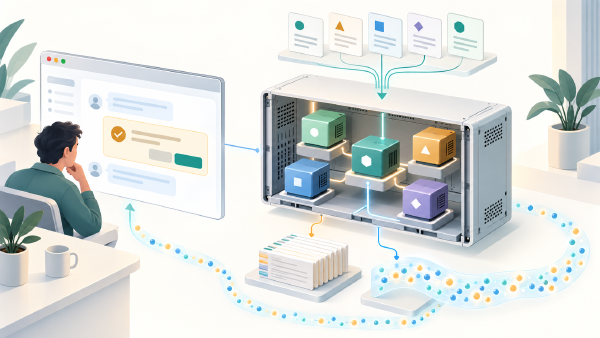

My agent team could tell me that Yuma was formed from six companies. Ask it to name them, and it could only find four. It acknowledged the missing information, but that still left me with a question: where had the other two companies disappeared? During extraction, storage, retrieval, or somewhere in the conversation between agents?
That is the kind of question I want evaluations to help answer. A final answer gives you a result; the route, tool calls, and retrieved evidence help you understand how the application reached it. With those details available, a failed evaluation becomes a starting point for a targeted fix.
In this post, you will see how I am building an evaluation harness around an Akgentic application using Pydantic Evals. You will follow a complete agent conversation through behavioral checks, controlled fixtures, and model-and-tool traces, then see how to calibrate LLM judges and inspect their decisions alongside the evidence. The aim is to make changes to an agent application easier to test—and failures easier to explain.
I built this harness inside one application, but I do not think all of it belongs there. As we
work through the implementation, I separate Knowledge Akgents-specific acceptance rules from the
runtime, evidence, and evaluator plumbing that another Akgentic application could reuse. The first
version of that boundary now lives as an akgentic_evals package inside the Knowledge Akgents
repository. By the end, you should have a concrete starting point for what that module can own,
what should remain with each application, and what still needs proof in a second application.
The example is my Knowledge Akgents sample, introduced in the earlier Qdrant article. Its goal is to turn web pages into knowledge you can ask questions about. A team extracts entities and their relationships, stores them in a graph, and searches that graph to answer later questions. One agent handles ingestion, another queries the knowledge, and a manager routes the conversation.
Two examples run through the project. My about page supplies a person’s profession and professional interests: you can ask about Jettro Coenradie and learn that I am a software architect and search enthusiast. Yuma’s background page supplies a different shape of knowledge: a company, its purpose, and the companies that came together to form it. Answering that second example requires preserving and retrieving a complete set of related entities—the requirement that the opening example exposed.
Select a thumbnail to explore the application, or click the large screenshot to enlarge it.
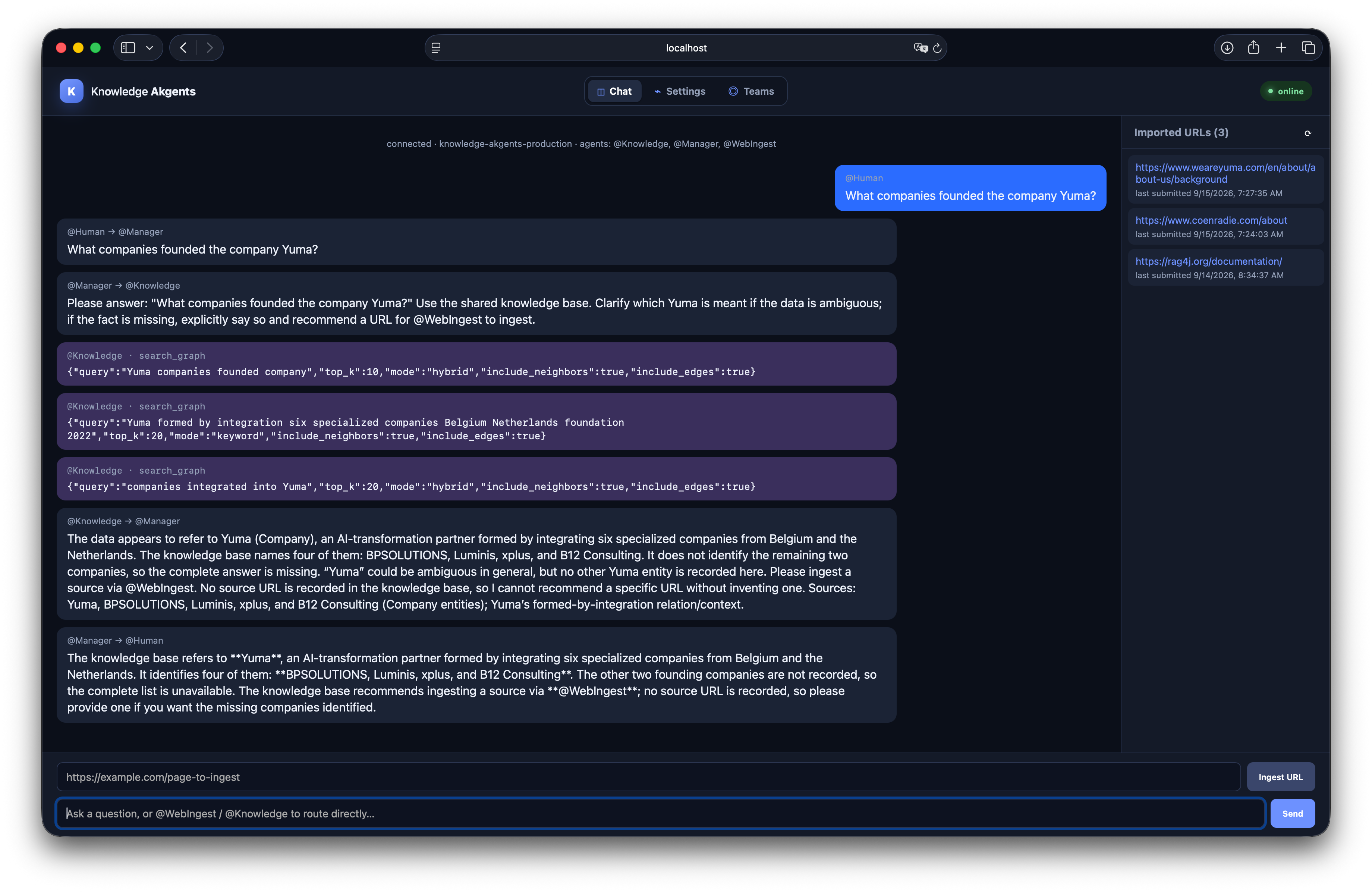
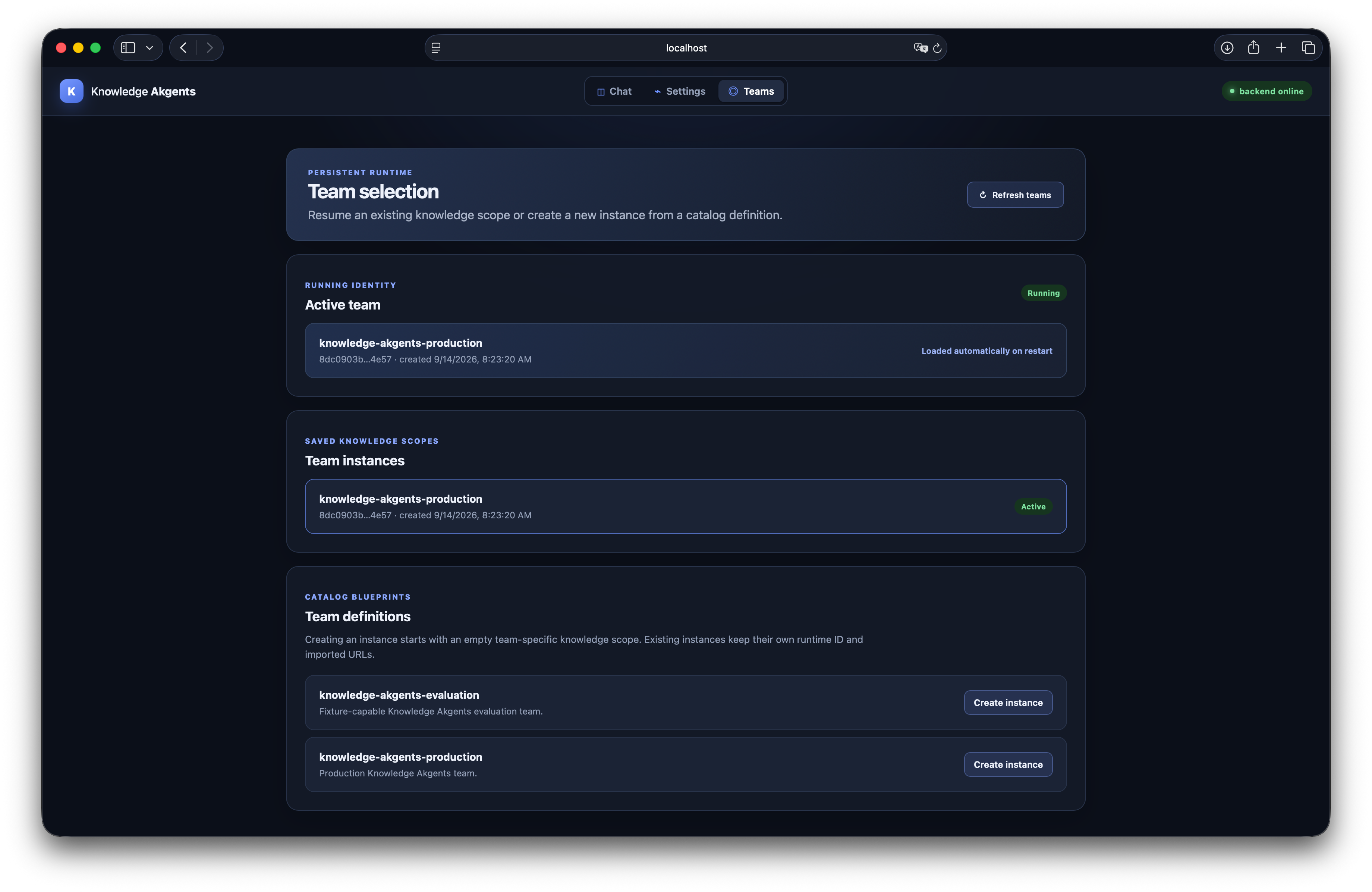
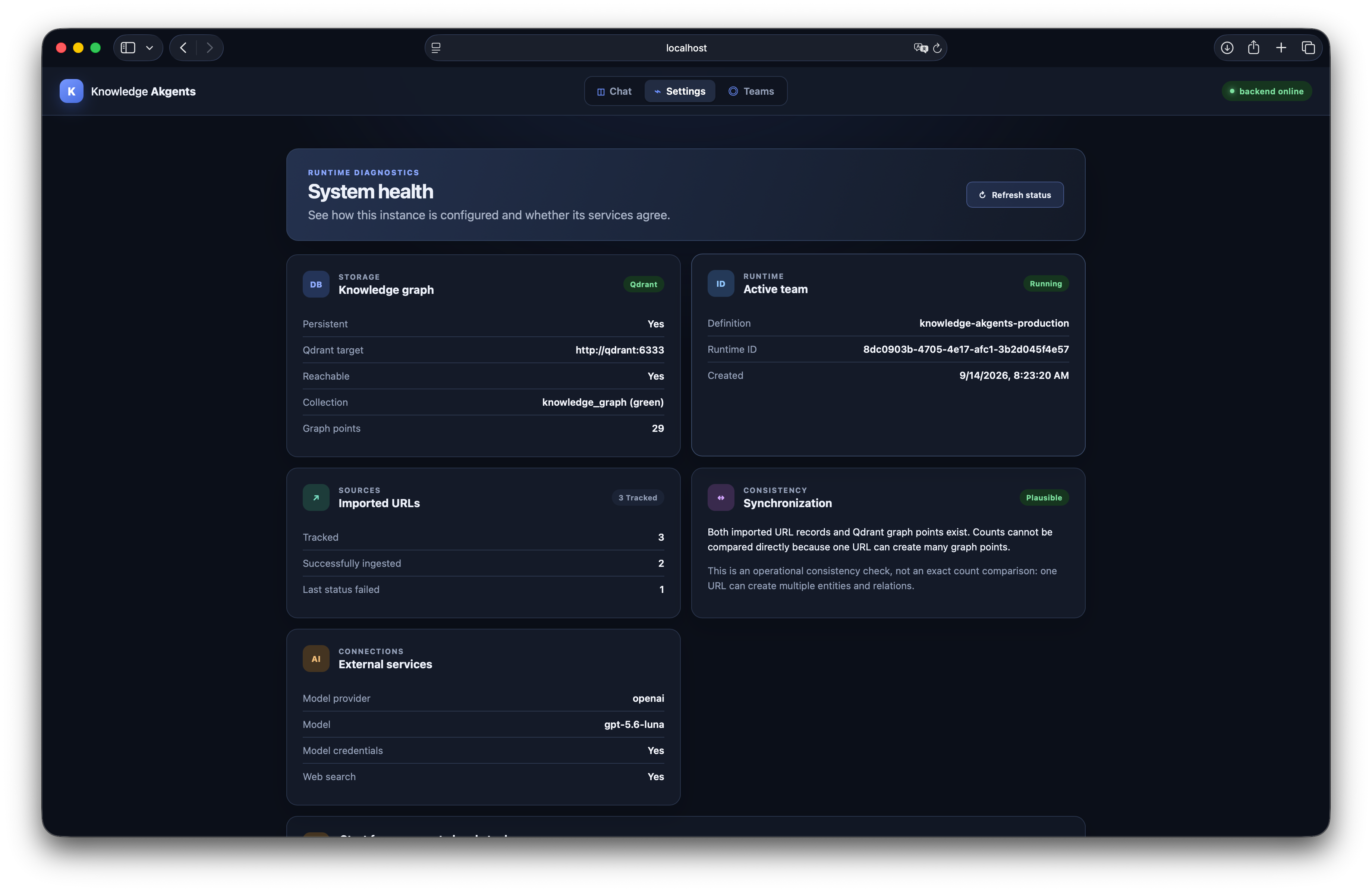
There is a similar lesson in the saved
rag4j-documentation.json
report. The groundedness and answer-relevance assertions passed for all eight responses, yet seven
cases failed an application acceptance check. You can therefore have an answer that addresses the
question and stays faithful to its retrieved evidence while that evidence is missing facts the
application should provide. To evaluate the application, I need to check both.
Start with the application behavior you want to trust#
The browser acts as the human’s interface to the team. FastAPI accepts messages and streams agent
activity back over a WebSocket. @Manager normally delegates to @Knowledge or @WebIngest.
The specialists use knowledge-graph tools backed by a shared vector-store actor.
To understand what an evaluation should check, you first need to understand what this application retrieves. A familiar RAG pipeline splits documents into chunks, embeds those chunks, and retrieves relevant passages for a model. This sample introduces another step: the ingestion agent extracts entities, descriptions, and relationships from the fetched content. Those become the knowledge that the graph tools store and search. Embeddings still support retrieval through the vector store, but the searchable representation is organized around entities and relationships.
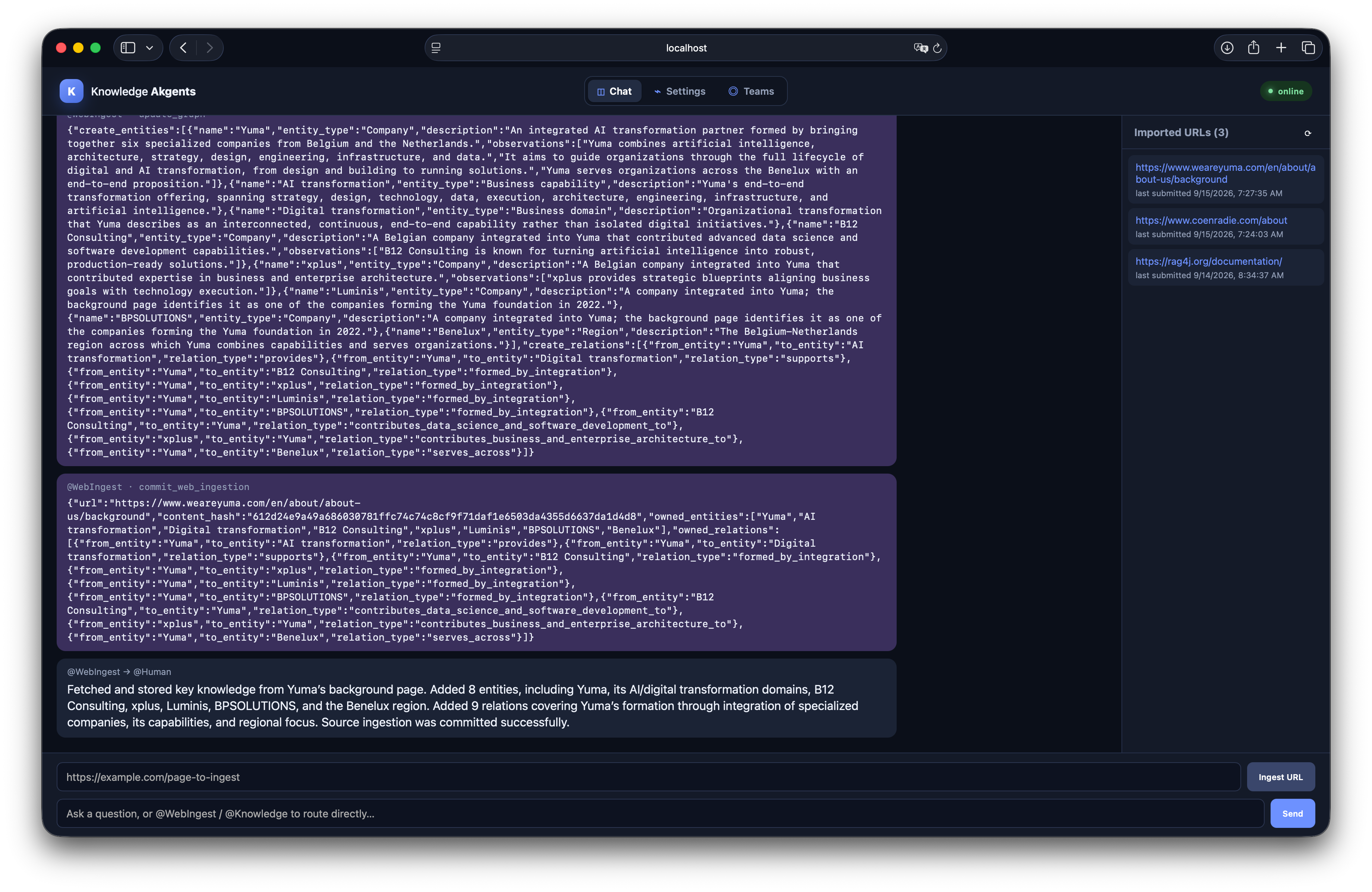
Look at Ingest a page in the screenshot gallery above. The update_graph arguments contain
create_entities and create_relations. Yuma is a company entity; its transformation capabilities
and the companies associated with its foundation are also represented. A relationship connects
Yuma to a founding company. For example, this relation appears in the captured update:
{
  "from_entity": "Yuma",
  "to_entity": "Luminis",
  "relation_type": "formed_by_integration"
}
The ingestion flow is therefore: fetch the page, extract its entities and relationships, update
the graph, and commit the source’s ingestion state. Later, search_graph retrieves evidence from
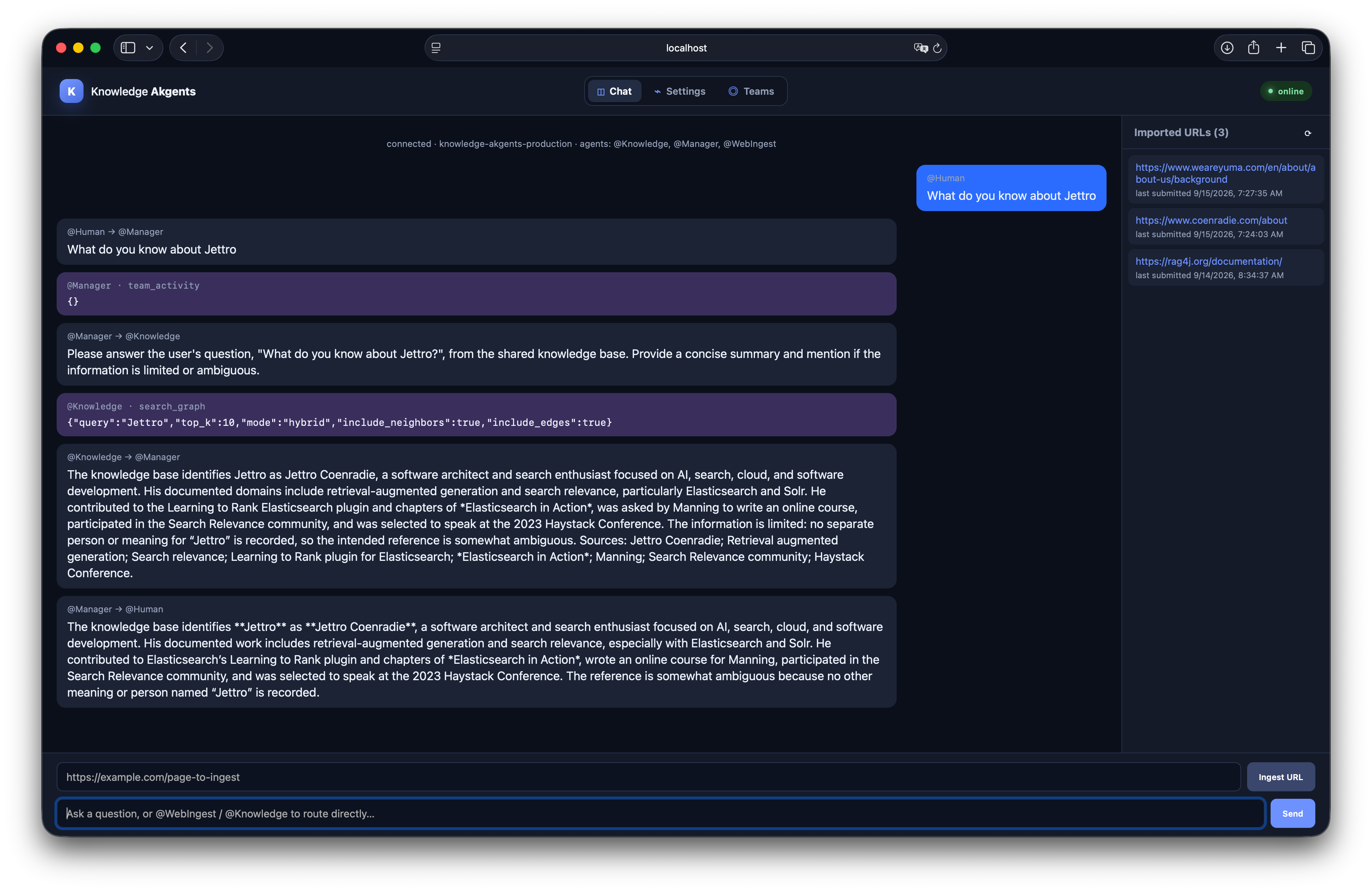
that representation. In the Ask about Yuma screenshot, the search requests also include
neighbors and edges, making connected knowledge available to the agent.
This extra representation step creates an extra place to investigate missing information. The visible ingestion update includes four founding-company entities: B12 Consulting, xplus, Luminis, and BPSOLUTIONS. The later answer names those same four and says two are missing. That suggests the knowledge may already have been incomplete before the question was asked. The screenshots show one update and one conversation, so they do not prove the complete state of the graph or the cause of the omission. They do give us a concrete hypothesis to test.
For this application, I want to check whether ingestion preserved the entities and relationships needed for later questions, whether retrieval returned them, and whether the answer used them. A search can execute successfully even when the representation it searches is missing a crucial fact.
For a retrieval question, a useful contract reaches further than the wording of the answer:
- The conversation reaches the knowledge specialist and returns to the human.
- The specialist actually calls
search_graphand receives a successful result. - A read-only question does not trigger a graph update.
- The retrieved evidence contains the facts the case expects.
- The final response uses those facts appropriately.
- The team completes without actor errors or excessive searches.
Each assertion answers a different question. If the expected fact is missing from the tool result, rewriting the final-answer prompt may address the wrong problem. If the evidence is present but the answer omits it, the investigation moves further along the path.
Run one complete evaluation first#
Before looking inside the harness, start with one question: What is the profession of Jettro
Coenradie? The reviewed fixture describes me as a software architect and search enthusiast.
The existing jettro-profession case requires the answer to contain “software architect.” Its
shared evaluators also require a completed conversation through @Knowledge, a successful
search_graph call, and no web fetch or graph update.
The following small runner selects that case and adds an evidence assertion, so you check both what the search returned and what the team told the human. It uses the sample repository’s existing dataset loader and runtime adapter; the following sections explain how those work.
from functools import partial

import logfire

from akgentic_evals.datasets import select_case
from akgentic_evals.evaluators import ToolEvidenceContainsTerms
from akgentic_evals.reporting import save_report
from akgentic_evals.runtime import run_case_with_factory
from evals.harness.dataset_loader import RETRIEVAL_DATASET_PATH, build_json_dataset
from evals.harness.runtime import KnowledgeRuntimeFactory

logfire.configure(send_to_logfire=False, console=False)
logfire.instrument_pydantic_ai()

dataset = build_json_dataset(RETRIEVAL_DATASET_PATH).dataset
select_case(dataset, "jettro-profession")
dataset.add_evaluator(ToolEvidenceContainsTerms(
    tool_name="search_graph",
    required_terms=("software architect",),
))

task = partial(
    run_case_with_factory,
    runtime_factory=KnowledgeRuntimeFactory("evaluation"),
)
report = dataset.evaluate_sync(task, max_concurrency=1)
report.print(include_output=True, include_reasons=True)
save_report(report, "eval-reports/first-profession.json")
With the sample repository’s dependencies installed and OPENAI_API_KEY configured, save this as
first_evaluation.py in its root and run:
AKGENTIC_QDRANT_URL='' uv run python first_evaluation.py
make eval-viewer
Open eval-reports/first-profession.json in the viewer. The empty Qdrant setting selects the
in-memory backend, and this case supplies controlled knowledge instead of querying your stored
graph. The agents still call a live model, so this run incurs model usage; no LLM judges are
enabled.
build_json_dataset() creates native Pydantic Evals cases and evaluators. task turns each case’s
input into an observed team conversation. evaluate_sync() executes that task, applies the
evaluators to its output, and returns the report. You can read its assertions as follows:
| Evidence check | Answer check | Next investigation |
|---|---|---|
| Pass | Pass | Check the route, tool behavior, and completion assertions too |
| Pass | Fail | Inspect how the team used the returned fact, including the Manager’s final response |
| Fail | Either | Inspect the search request and captured result before changing answer wording |
These are possible outcomes, not a recorded result from this snippet. The term checks give you a small, inspectable starting contract; they do not establish that every claim in the answer is correct. For your own application, replace the question and reviewed facts, then select the allowed tools and behavior that its answer must satisfy.
Turn an Akgentic conversation into an experiment#
Give Pydantic Evals a task it can execute#
Pydantic Evals organizes an experiment around cases, a task callable, and evaluators. The task does not have to be a bare Pydantic AI agent. That makes it possible to wrap the actor-based application in a small adapter.
I use that flexibility in two ways. The callable interface lets me ask Pydantic Evals to execute
the whole application instead of one isolated agent. Separately, Akgentic’s LLM implementation
wraps pydantic_ai.Agent, which gives me instrumentation access to model and tool execution. If
you only use Pydantic models for configuration, you do not get that second benefit.
The harness turns a KnowledgeCaseInput into an AkgenticCaseOutput. The reusable part of the
input describes either one message or an ordered conversation, optional direct routing, and a
response timeout. The Knowledge-specific environment adds controlled dependencies. The output
keeps the final response alongside messages, tool calls, tool returns, retrieved evidence, usage,
errors, and the reason execution ended.
flowchart TD
    D["Case data and expectations"] --> E["Pydantic Evals"]
    E --> A["Task adapter"]
    A --> T["Akgentic team"]
    T --> C["Messages and tool events"]
    T --> P["Pydantic AI spans"]
    C --> O["Structured case output"]
    O --> V["Application evaluators"]
    P --> V
    V --> R["Native report"]
    R --> U["CLI and local viewer"]
Pydantic Evals owns experiment execution and reporting. akgentic_evals owns the reusable
execution and evidence contracts. The application owns runtime construction, fixture composition,
and the definition of acceptable behavior.
The reusable input describes the conversation I want to exercise. ConversationTurn and
AkgenticCaseInput now live in
src/akgentic_evals/runtime.py.
The application-specific KnowledgeCaseInput in
evals/harness/models.py
extends that input with a nested KnowledgeEvaluationEnvironment:
class ConversationTurn(BaseModel):
    message: str
    target: str | None = None


class AkgenticCaseInput(BaseModel):
    message: str | None = None
    target: str | None = None
    turns: list[ConversationTurn] = Field(default_factory=list)
    timeout_seconds: float = Field(default=180.0, gt=0)

    def ordered_turns(self) -> list[ConversationTurn]:
        ...


class KnowledgeCaseInput(AkgenticCaseInput):
    environment: KnowledgeEvaluationEnvironment = Field(
        default_factory=KnowledgeEvaluationEnvironment
    )
A simple retrieval case supplies message. An ingestion-and-query case supplies turns, so the
second question can use knowledge created by the first turn. The full model rejects inputs that
supply both forms or neither. Its ordered_turns() method converts a single message into a
one-element list. This behavior now belongs to akgentic_evals, not the Knowledge harness. Fixture
paths, fixture knowledge, controlled web failures, and catalog choices remain in Knowledge
Akgents. An optional target lets a case address a specialist directly and test whether it
bypasses the manager.
The reusable output in
src/akgentic_evals/models.py
gives every evaluator the same evidence to inspect. These are its core result fields:
class AkgenticCaseOutput(BaseModel):
    final_response: str | None
    human_responses: list[str]
    completion_reason: str
    messages: list[MessageRecord]
    tool_calls: list[ToolCallRecord]
    tool_returns: list[ToolReturnRecord]
    tool_evidence: list[ToolEvidenceRecord] = Field(default_factory=list)
    llm_usage: list[LlmUsageRecord] = Field(default_factory=list)
    errors: list[str]
final_response is convenient for judging the last answer, while human_responses lets an
evaluator check an earlier turn, such as the ingestion confirmation. messages records the
observed route. tool_calls records requested operations and their arguments; tool_evidence
records returned content. A timeout or actor error is represented explicitly, so an evaluator
can distinguish an incomplete run from an unacceptable answer.
The application runner connects those models. For local cases it binds the Knowledge-specific factory to the reusable lifecycle:
task = partial(
    run_case_with_factory,
    runtime_factory=KnowledgeRuntimeFactory(catalog_team),
)
AkgenticRuntimeFactory is generic over the application’s input type. The reusable lifecycle can
therefore pass KnowledgeCaseInput to KnowledgeRuntimeFactory without understanding its
environment. That factory creates temporary state, resolves fixture tools and the catalog card,
and constructs KnowledgeTeamRuntime.
The reusable run_case() function subscribes before the first message, sends the ordered turns,
waits for one additional response after each turn, stops after an error, runtime stop, or timeout,
and always shuts the runtime down.
AkgenticEventAdapter in
src/akgentic_evals/adapters.py
translates raw Akgentic and Pydantic AI events into the normalized events consumed by the
thread-safe collector in src/akgentic_evals/collector.py.
Pydantic Evals receives the resulting AkgenticCaseOutput directly. Evaluators can inspect it
without knowing how to start actors, decode framework events, or wait for responses.
Keep one conversation together and separate independent cases#
I chose the case as the state boundary. The local adapter creates a temporary state directory and a fresh team for each case. Within that case, it sends turns in order and waits for the expected number of human-directed responses. You can therefore ingest a page, ask a question, and ask a follow-up against the same knowledge, while the next independent case starts with a separate team.
The collector uses a thread condition to wait for completion. Its CompletionPolicy decides which
normalized messages count as responses; the current MessageResponseCompletion can restrict both
recipient and sender. Errors, runtime stops, and timeouts remain explicit completion reasons.
run_case() shuts down the runtime in a finally block. These lifecycle details belong in the
reusable package so every application and dataset does not have to solve them again.
The current timeout applies to each wait for a response. It is not a single deadline encompassing startup, every turn, and shutdown. That distinction matters when turning this sample into a more general harness.
Collect what the tools returned, not just their names#
Akgentic’s message events let you reconstruct the route. Tool-call events add the requested tool and arguments, while tool-return events tell you whether an invocation succeeded. I can use those events for behavioral checks, but a successful search alone still does not tell me what the agent learned.
The collector also reads ToolReturnPart content from Pydantic AI model-request messages carried
by Akgentic’s LlmMessageEvent. This is the evidence actually returned to the model.
Retrieval-answer judges receive that captured search content rather than a fixture file containing
facts the model may never have seen.
The pair (run_id, tool_call_id) links requests, returns, and evidence. Using only the call ID can
join records from different model runs when an SDK reuses identifiers. Parsed arguments support
assertions about URLs, flags, and graph updates; the original arguments and any parse error remain
available for diagnosis. Deterministic evidence checks and retrieval-answer judges now both select
evidence from correlated successful returns through successful_tool_evidence().
That distinction appeared across the saved RAG4j run. All eight cases completed, and both judge
assertions passed in every case, but seven cases failed an application acceptance assertion.
Several were missing-evidence failures even though search_graph returned successfully. The
report does not by itself tell us whether extraction, graph storage, retrieval ranking, or the
search request lost those facts. It does tell us not to start by rewriting an answer prompt: the
missing terms were already absent from what the answer model received. I return to one of those
cases when we inspect the report in detail.
A handled web-fetch failure produces a different combination of signals. The controlled
unreachable-URL scenario makes web_fetch_tool return a payload shaped like this:
{
  "results": [],
  "failed_results": [
    {
      "url": "https://eval.invalid/unreachable",
      "error": "Connection timed out while fetching the evaluation URL"
    }
  ]
}
The function executed and returned that structured result, so the invocation is successful at
the tool-event level. The operation requested by the user did not succeed. The scenario therefore
requires the captured evidence to contain failed_results and the timeout message, allows no
update_graph call, and checks that the final response explains the fetch failure. In the recorded
run, the agent made one fetch attempt, performed no graph update, and told the user that nothing
was stored.
| Signal | Inadequate search_graph evidence | Handled web_fetch_tool failure |
|---|---|---|
| Tool invocation | Returned successfully | Returned successfully |
| Captured content | Missing required domain facts | Contains a structured failed_results entry |
| Correct evaluation | Fail evidence or answer acceptance | Pass only if no graph write follows and the failure is reported |
Tool success answers did the function run and return? Evidence assertions answer did it return what this application needed? Keeping those questions separate turns one vague failed case into a much narrower investigation.
Carry evaluation context across actor threads#
There is another boundary you need to account for when evaluating an Akgentic team: the evaluation task and the agents do not run on the same thread. Akgentic uses Pykka worker threads, and Python context variables do not automatically follow a queued message.
Without propagation, Pydantic AI can still create model and tool spans, but Pydantic Evals may not
associate them with the case that triggered the work. You then get a successful evaluation output
with an incomplete span_tree.
I solve that by capturing the current context before a message enters the actor queue and restoring
a fresh copy around the receiving handler. These functions come from
src/knowledge_akgents/trace_context.py:
def attach_message_context(message: Message) -> None:
    if not isinstance(getattr(message, _CONTEXT_ATTRIBUTE, None), Context):
        setattr(message, _CONTEXT_ATTRIBUTE, copy_context())


def run_in_message_context[T](message: Any, callback: Callable[[], T]) -> T:
    context = getattr(message, _CONTEXT_ATTRIBUTE, None)
    if not isinstance(context, Context):
        return callback()
    return context.copy().run(callback)
The application-owned agent classes call attach_message_context() when sending and wrap
on_receive() with run_in_message_context(). Capture happens before the thread boundary, so the
message retains the evaluation case’s context even if the sender’s current context changes later.
sequenceDiagram
    participant E as Pydantic Evals task
    participant Q as Pykka actor queue
    participant A as Agent worker thread
    participant P as Pydantic AI

    E->>E: Capture current context
    E->>Q: Send message with private context
    Q->>A: Deliver on worker thread
    A->>A: Restore a copy around on_receive
    A->>P: Execute model and tools
    P-->>E: Record spans under the evaluation case
A deterministic regression test creates an evaluation-case span on the test thread and an
actor-work span on a second thread. It verifies that the actor span’s parent is the evaluation
span. A separate assertion confirms that the private context attribute is absent from
message.model_dump(), so the in-process context does not leak into serialized messages.
This is deliberately a local thread-propagation solution. It carries both the OpenTelemetry parent
and Pydantic Evals’ in-process collector context, which a trace header alone would not do. A remote
or persisted message needs explicit transport correlation instead; a Python Context cannot
cross that boundary.
You can see the difference in the saved reports: the
trace-context-verification.json
report contains the actor spans, while the
rag4j-documentation.json
running-system report contains tool evidence but no spans. The two execution paths provide
different observability guarantees.
Control what the experiment exercises#
Choose which dependencies the experiment should exercise#
A fixed input does not make a live model deterministic. I therefore separate ordinary tests from several kinds of live evaluation. The table helps you choose which dependency should remain real for the question you are asking:
| Evaluation mode | Controlled boundary | What remains real |
|---|---|---|
| Deterministic harness tests | Test messages and mocked dependencies | Collector, evaluator, schema and state logic |
| Fixture retrieval | Reviewed knowledge records | Agent model, prompts and routing |
| Fixture ingestion | Reviewed page content and isolated state | Agent model and graph-tool behavior |
| Production-tool end-to-end | Temporary URL state and memory vector backend | Production team configuration and Tavily |
| Running-system retrieval | Previously ingested application state | Existing backend, team and search tool |
Fixture retrieval replaces the knowledge tool with a small lexical search over reviewed records. It tests how the agent uses controlled evidence. It does not validate Qdrant ranking or embedding quality. Fixture ingestion replaces fetched content while retaining the ingestion workflow.
Production-tool evaluations resolve the production catalog definition, but the supplied Make targets still select the isolated in-memory vector backend. Production configuration and production mutable data are separate choices.
Share team definitions without putting test fixtures into production#
The production catalog owns the agents, prompts, model defaults, and tools. Rather than copy those definitions, the evaluation catalog points its members to the production cards. The Knowledge member is one example:
members:
  - card:
      __ref__: knowledge
      __namespace__: knowledge-akgents-production
      __type__: akgentic.core.AgentCard
Resolving this reference brings in the production agent class, prompt, model configuration,
vector-store tool, and read-only knowledge-graph tool. A reviewed prompt change therefore reaches
both application and evaluation runs. After resolution, the harness replaces only the dependency
controlled by the case; KnowledgeTeam receives the completed TeamCard without
fixture-specific constructor arguments.
Fixture composition happens only after those references have been resolved. The harness locates the expected production tool on one named agent and replaces that one entry:
def _replace_agent_tool(
    team_card: TeamCard,
    *,
    agent_name: str,
    replacement: ToolCard,
    expected_type: type[ToolCard],
    require_read_only: bool = False,
) -> None:
    card = team_card.agent_cards[agent_name]
    if not isinstance(card.config, AgentConfig):
        raise ValueError(f"Catalog agent {agent_name!r} does not use AgentConfig")

    replacements = 0
    tools: list[ToolCard] = []
    for tool in card.config.tools:
        matches = isinstance(tool, expected_type)
        if require_read_only and isinstance(tool, KnowledgeGraphTool):
            matches = matches and not tool.update_graph
        if matches:
            tools.append(replacement)
            replacements += 1
        else:
            tools.append(tool)

    if replacements != 1:
        raise ValueError(
            f"Expected exactly one replaceable {expected_type.__name__} "
            f"on {agent_name}, found {replacements}"
        )
    card.config = card.config.model_copy(update={"tools": tools})
The function is intentionally strict. It targets a named agent and expected tool type. For a
retrieval fixture, require_read_only=True prevents the harness from replacing an update-capable
graph tool by mistake. Finding zero or multiple candidates raises an error instead of silently
running a different experiment. The copied configuration preserves the agent’s prompt, model, and
all tools that were not selected.
The catalog loader adds another guard: fixture tools are accepted only for the evaluation team. Trying to supply one while selecting the production catalog raises an error. This prevents a run labelled as production from quietly using controlled knowledge or web content.
| Responsibility | Owner | Example |
|---|---|---|
| Team configuration | Production catalog | Agent roles, prompts, model defaults and normal tools |
| Runtime binding | Evaluation harness | Replace exactly one resolved tool for one case |
| Fixture data | Dataset or scenario | Reviewed knowledge records, page text or a controlled fetch failure |
A retrieval case shows the full path. Its dataset selects reviewed knowledge records.
tasks.py constructs a FixtureKnowledgeTool from those records. load_case_team_card() resolves
the production-backed evaluation team and replaces only @Knowledge’s read-only graph tool.
KnowledgeTeam receives the completed TeamCard; it starts and runs the team without any
fixture-specific branches. The production definition describes the application, the harness binds
the dependency for this execution, and the case supplies the data.
Make ordinary retrieval cases data#
I do not want every new question to require another Python runner. Instead, the project defines a strict JSON format for reviewed knowledge, questions, metadata, and supported evaluator configurations. You add the case data; the loader validates that project format and constructs native Pydantic Evals cases.
Every retrieval case receives shared behavioral checks. Case-specific data adds expected answer terms, accepted wording variants, required tool-evidence terms, or a search-call budget.
The current controlled dataset has thirteen cases: canonical questions, paraphrases, a company
list, synthesis across entities, partial knowledge, unknown facts, and deliberately conflicting
synthetic evidence. A separate eight-case dataset queries RAG4j knowledge in the running system.
That dataset lives as a copyable application-owned example in
evals/examples/rag4j/,
separate from the shared schema and the built-in controlled dataset.
A dataset file can be small while still describing a complete experiment input. This version-2 example targets knowledge already available in the running application:
{
  "$schema": "../../datasets/schema.json",
  "version": 2,
  "task": "retrieval",
  "name": "knowledge-akgents/rag-components",
  "knowledge": {
    "source": "running_system"
  },
  "cases": [
    {
      "name": "rag-system-components",
      "message": "What are the three main parts of the RAG system?",
      "metadata": {
        "topic": "overview"
      },
      "evaluators": [
        {
          "type": "tool_evidence_contains_terms",
          "tool_name": "search_graph",
          "required_terms": [
            "retriever",
            "generator",
            "quality component"
          ]
        }
      ]
    }
  ]
}
version and task select the schema understood by this loader. The knowledge object selects an
execution boundary: running_system uses the existing application and its stored knowledge, while
fixtures supplies reviewed records to the local evaluation team. Each case provides the message,
optional metadata, and only the assertions specific to that question.
The loader adds the shared retrieval contract to every case: successful completion, the expected
route through @Knowledge, at least one successful search_graph call, and no web_fetch_tool or
update_graph calls. Dataset authors therefore do not need to repeat those safeguards for every
question.
Evaluator configuration is deliberately allow-listed. The type field is a discriminator that
Pydantic uses to parse one of four supported definitions. For the evaluator above, the conversion
to executable Python is direct:
if isinstance(definition, ToolEvidenceContainsTermsDefinition):
    return ToolEvidenceContainsTerms(
        tool_name=definition.tool_name,
        required_terms=definition.required_terms,
    )
tool_name defaults to search_graph, so the JSON only needs the expected terms. The resulting
evaluator inspects the captured ToolReturnPart content rather than the final answer. A separate
human_response_contains_terms evaluator can assert that the answer used those facts. Keeping both
checks makes it possible to distinguish missing retrieval evidence from an answer that ignored
available evidence.
The Pydantic definitions reject unknown fields and validate details such as unique case names, known fixture references, nonempty vocabularies, and valid evaluator ranges. A typo therefore fails while loading the dataset instead of quietly producing an unevaluated case.
This JSON is a project-specific authoring format, not Pydantic Evals’ native dataset serialization.
build_json_dataset() validates it and converts each record into a native Case, then combines
those cases and the shared evaluators into a native Dataset. Pydantic Evals still executes the
experiment and produces the report; the additional format defines what is convenient and safe for
this application’s authors to maintain.
Use scenarios when state changes are the subject#
You cannot express every requirement as a list of independent questions. When the state transition is the behavior I want to evaluate, I use a scenario. The change-aware ingestion cases fetch the same URL twice, explicitly force reprocessing, or replace the fixture content between turns.
The unchanged case expects two fetches but only one graph update and one commit. The forced case expects two update-and-commit sequences. The changed-content case checks that stale source-owned facts are included in deletion arguments.
The application hashes normalized extracted text. Equal content can skip extraction and graph updates, but the web fetch still happens. This is not an HTTP ETag mechanism. A changed extraction query can produce different text even when the origin page has not changed.
A commit accepts a pending content hash; correct update-before-commit ordering is part of the agent’s contract and evaluation. It is not an atomic transaction spanning the graph and URL state.
Other scenarios cover malicious instructions embedded in a page, boilerplate with no useful knowledge, controlled fetch failures, and direct specialist routing. Each targets a specific behavior rather than claiming comprehensive resilience.
Interpret the evidence before changing the application#
Test the judge before using it to judge the application#
“Judge training” in this project means rubric calibration. No model weights are trained. A static case supplies a question, evidence, and a prewritten candidate answer. I label groundedness and answer relevance independently, then compare each judge decision with its human label. Negative examples should receive negative judgments; calibration quality is agreement, not a high raw pass rate.
Two controls show why groundedness and relevance need separate labels. In the invented-profession case, the reviewed evidence says that Jettro Coenradie is a software architect and search enthusiast. The candidate answer says:
Jettro Coenradie is a data scientist.
The answer directly supplies the requested profession, so its human relevance label is true.
The profession is unsupported, so its groundedness label is false. If one judge tried to measure
both properties, that useful distinction would collapse into a single failure.
The incomplete-list case creates the opposite combination. The evidence names all six companies that formed Yuma, while the candidate gives only five:
Yuma was formed by xplus, Luminis, BPSOLUTIONS, Total Design, and Aprico.
Every company it does name is supported, so groundedness is true. The question asks for the
companies that formed Yuma, however, and the answer omits B12 Consulting. Answer relevance is
therefore false because completeness is part of answering a list question.
| Calibration case | Groundedness | Answer relevance | Reason |
|---|---|---|---|
| Invented profession | Fail | Pass | Direct answer, unsupported fact |
| Incomplete company list | Pass | Fail | Supported claims, incomplete requested scope |
The missing-fact controls exposed a less obvious relevance problem. When asked for Jettro’s favorite database, the evidence contains no database preference. An early judge rejected a clear answer saying that the evidence did not provide the fact because the rubric required the requested database to appear. That treated unavailable knowledge as though every question must have a positive answer.
The relevance rubric was refined to accept two forms of direct response: provide the requested fact, or clearly explain that the reviewed evidence does not contain it. A generic response such as “I don’t know” remains incomplete because it does not connect the uncertainty to the available evidence. The rubric also states that a direct but invented database can pass relevance; groundedness is responsible for rejecting the unsupported claim:
When the reviewed evidence does not contain the requested fact, a complete and
relevant answer may clearly state that the evidence does not provide it. A
generic refusal that does not connect the missing answer to the reviewed
evidence is incomplete. However, if the candidate directly supplies the
requested fact, judge that answer as relevant even when the fact is unsupported;
groundedness judges factual support separately.
The result counts need their dataset sizes and repetition settings. The earlier split calibration used eight cases, two judge dimensions, and three repeats. It achieved 48/48 agreement: 24 groundedness decisions and 24 answer-relevance decisions matched the human labels, with no decision flips across the repeats.
The dataset was later expanded to eleven cases covering positive answers, unsupported claims, irrelevant answers, incomplete lists, correctly unavailable facts, hallucinated direct answers, and generic refusals. After refining the relevance rubric, a recorded single run achieved 22/22 agreement: eleven groundedness labels and eleven answer-relevance labels. A later grounding-scope refinement retained 22/22 agreement in another recorded single run. That is not the same claim as repeating the current eleven-case dataset three times.
These results show agreement on a small, deliberately constructed calibration set. They support using the judges as additional diagnostic signals, not treating them as universally reliable or independent release authorities.
The labels and rubrics remain Knowledge Akgents policy, but the calibration mechanics no longer
do. EvidenceJudgeInput carries the question and reviewed evidence used by both live and static
judges. JudgeCalibrationInput extends it with the prewritten candidate answer needed by a
calibration dataset. Candidate-answer execution, per-dimension agreement, repeated-case grouping,
and the summary model also live in akgentic_evals.calibration. You can reuse that loop with
different judge dimensions and human-label keys without copying the RAG4j or Yuma examples.
Read the report as evidence#
The local viewer opens native report JSON and keeps it in browser memory. It presents runs, cases, assertions and reasons, measurements, inputs, outputs, and raw details. It does not execute evaluations or train judges. CLI baseline comparison exists; side-by-side viewer comparison is not implemented.
Open the saved
rag4j-documentation.json
report and examine one case at a time. All eight groundedness and all eight answer-relevance
assertions passed, while seven cases failed at least one application acceptance assertion. You can
see that several required facts were missing from search results. That points towards an ingestion
or retrieval coverage problem, but the report alone does not isolate extraction, graph
representation, ranking, or query formulation as the cause.
When the answer omits available evidence#
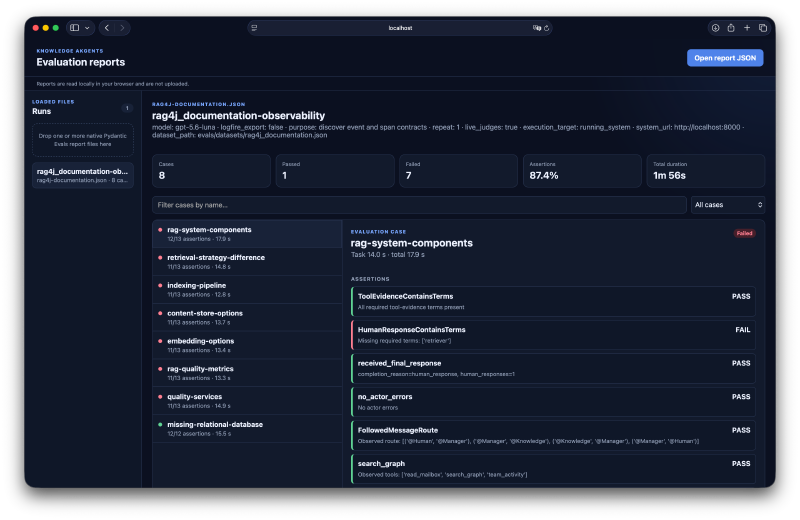
The selected case shows why the individual assertions matter. The tool evidence contains the expected terms, the team follows the required route, and a response reaches the human. The answer-term check still fails. That gives you a specific place to investigate: how the retrieved information became the final answer, and whether the wording requirement captures the intended meaning. The summary’s 87.4% assertion pass rate alone would hide that distinction.
When the required evidence never reached the answer#
The indexing-pipeline case in that same report shows a different failure from the selected case
in the screenshot. This is an earlier recorded run, not a new evaluation performed for this
article. Its question was:
Which components does RAG4j/p use to load, split, embed, and store a corpus?
The case expected five names in both the retrieved evidence and the answer: IndexingService,
ContentReader, Splitter, Embedder, and ContentStore. These are the case’s acceptance
expectations. The team’s one search_graph call used the query
RAG4j/p components load split embed store corpus, with hybrid search, neighbors, and edges enabled.
The captured result contained entities such as RAG4J, RAG4P, Retriever, and
RetrievalStrategy, together with relationships describing the project and its variants. For
example, it returned this relationship:
RAG4j/p --[implements_components_for]--> Retrieval Augmented Generation (RAG)None of the five required indexing-component names appeared in that returned evidence. The final answer acknowledged the gap:
The shared knowledge base does not identify the RAG4j/p components used to load, split, embed, and store a corpus, or describe their roles. It only identifies the
RetrieverandRetrievalStrategy. Please provide a source URL for ingestion via @WebIngest so this information can be added.
The report separates the outcomes into thirteen assertions:
| Assertion | Result | What it tells us |
|---|---|---|
ToolEvidenceContainsTerms | Fail | All five expected indexing-component names are missing from the search evidence |
HumanResponseContainsTerms | Fail | Those names are also missing from the answer |
received_final_response | Pass | A response reached the human |
no_actor_errors | Pass | No actor errors were recorded |
FollowedMessageRoute | Pass | The expected Human → Manager → Knowledge → Manager → Human route occurred |
search_graph | Pass | The required search tool was called |
did_not_call_web_fetch_tool | Pass | No web fetch was observed |
did_not_call_update_graph | Pass | No graph update was observed |
ToolCallCount | Pass | One search satisfied the minimum of one |
tool_arguments_parseable | Pass | The search arguments could be parsed |
tool_calls_succeeded | Pass | The search returned successfully |
groundedness | Pass | The answer stayed within the available evidence |
answer_relevance | Pass | The answer explained why the requested information could not be supplied |
Eleven passing assertions do not cancel the two failures. The team handled the available evidence appropriately, but the application did not supply the expected knowledge. Unlike the screenshot’s answer-wording failure, this case directs the investigation towards the evidence path: inspect what ingestion extracted and stored, then determine whether search could retrieve it. The report establishes that the facts were absent from this search result; it does not establish whether they were absent from the entire graph.
You now have two failures with similar final outcomes but different evidence paths. The next step is not to make every assertion green. It is to classify the failure and change the layer responsible for it.
Use failures to decide what to change#
The saved
production-e2e.json
report lets you see two different Yuma failures in one run. One answer described an
AI-transformation partner while the evaluator expected the literal word “digital.” Separately,
the agent fetched twice despite a one-fetch contract.
The first finding called for reviewing accepted wording. The second called for reviewing tool behavior. Fixing both by loosening the evaluator would erase the distinction.
The favorite-database case became the clearest example of using a failed evaluation to choose a change. The fixture contains facts about Jettro Coenradie but says nothing about a preferred database. The expected behavior is therefore not a database name. The team must search the knowledge, state that the fact is unavailable, avoid web or graph writes, recommend ingesting a source, and use no more than two searches.
The first live run got the most important safety behavior right: it did not invent a database. It still failed the contract because the final response omitted the ingestion recommendation. The Knowledge agent also made five graph searches. One retry was seeded with guessed database names, effectively asking retrieval to confirm candidates supplied by the model rather than by the evidence.
Those observations classify the failure as an application prompt-adherence and efficiency defect. The evaluator was correctly reporting that required behavior was absent. Loosening the search budget or removing the ingestion requirement would have hidden the problem.
The targeted change was made in the Knowledge prompt:
Start with one targeted search. Retry only when the result is empty because the
wording may not match; never add guessed answer candidates to a retry query. If
the requested fact is not present, say so plainly and include this exact
sentence:

"Please ingest a source via @WebIngest."
The case retained its maximum of two search_graph calls. The behavior was changed to meet the
contract; the contract was not changed to match the first run.
The first rerun reduced five searches to one, but the final response still omitted the ingestion recommendation. That confirmed that the retry guidance improved search behavior but had not yet made the required next step survive the complete route through the team.
The rerun also exposed a separate issue. The answer used the valid phrase “does not state,” but that wording was absent from the accepted missing-knowledge vocabulary. This part was an evaluator vocabulary defect, not another application failure. Adding the phrase broadened recognition of equivalent wording without weakening the requirement to acknowledge missing knowledge.
Two application changes completed the correction. The Knowledge prompt now requires the exact
ingestion sentence, and the Manager prompt says to preserve the specialist’s @WebIngest
recommendation when relaying a missing-fact answer. That second change matters because evaluating
only the specialist’s response would miss information dropped by the final routing step.
| Run | Evidence | Classification | Targeted response |
|---|---|---|---|
| Initial run | Five searches, guessed candidates, no ingestion guidance | Application defect | Constrain retries and require a next step |
| First rerun | One search, still no guidance | Application defect remains | Require exact guidance and preserve it through Manager |
| First rerun wording | “Does not state” rejected | Evaluator vocabulary defect | Accept equivalent missing-knowledge wording |
| Final rerun | Two targeted searches, missing fact stated, source requested | Expected behavior | Retain as regression baseline |
The final approved rerun passed every assertion. It made two non-speculative searches, stated that
the knowledge base did not contain Jettro’s favorite-database fact, avoided inventing an answer,
and asked for a relevant source to ingest through @WebIngest. All tool calls succeeded.
Not every failed assertion in later experiments justified another application change. The same area produced examples from three other categories:
| Failure category | Example | Appropriate response |
|---|---|---|
| Evaluator vocabulary | A valid answer says “not present,” but the accepted phrases omit it | Extend equivalent accepted wording while retaining the behavioral requirement |
| Judge rubric | Relevance demands an unavailable database, or grounding treats ingestion advice as a domain claim | Add human-labeled controls and refine the judge’s single-property rubric |
| Model variance | One full-suite run uses three searches, while three focused repetitions each use one | Keep the limit visible and gather repeated evidence before changing prompts |
| Application behavior | The agent guesses retry candidates or drops required guidance | Change the prompt or routing behavior and rerun the same case |
The variance example is particularly important. A later nine-case run passed the answer and both judges but used three searches instead of the maximum of two. Rather than immediately rewriting the prompt or relaxing the evaluator, I repeated only this case three times. Every repetition used one targeted search and produced the expected missing-fact response. That small sample suggested an isolated nondeterministic excursion, so the two-search contract remained unchanged.
The lesson is not that every red assertion demands code or prompt changes. First locate the failing layer. Change application behavior when the observed route, tool use, or answer violates the intended contract. Change evaluator vocabulary when valid equivalent wording is rejected. Change a judge only when it disagrees with reviewed human labels about the property it is supposed to measure. When one run looks anomalous, repeat the focused case before deciding that either the application or its contract is wrong.
Run the experiment and find the reusable boundary#
Evaluate the running team with its actual knowledge scope#
Qdrant data is scoped to the runtime team identity. If you create another team from the same definition, it still cannot see the original team’s knowledge. I therefore send running-system questions through the existing backend’s WebSocket endpoint rather than creating a fresh team for the evaluation.
Persistent team identity now survives through TeamManager, YamlEventStore, and the selected
runtime UUID. The Teams screen separates definitions from instances, while Settings shows the
active team and storage status.
There are still limits to experiment isolation. The WebSocket bridge broadcasts events, the adapter does not correlate them to an individual evaluation request, and cases share the live team’s conversation history. Serial execution within the runner does not exclude other clients. The current report metadata also lacks the active runtime UUID. These are concrete requirements for a more general harness.
The running-system path no longer builds a separate output representation. RunningSystemRuntime
decodes WebSocket payloads into the same normalized events and delegates turn execution to the
same run_case() function as the in-process adapter. This removes one source of behavioral drift,
but it does not manufacture guarantees that the transport lacks. Because this runtime needs only
the system URL and generic conversation turns, it is passed directly to run_case(); the
case-aware factory remains necessary only for local Knowledge runtime construction.
The runner records those guarantees as RuntimeCapabilities in report metadata. The isolated
in-process runtime declares request correlation, isolated execution, and trace context. The
current WebSocket runtime declares all three as unavailable, and neither runtime yet detects actor
quiescence. You can therefore see in the report whether an execution path supports the claim an
evaluator or investigation wants to make.
A practical execution loop#
I use the existing Make targets as a progression. You can start with deterministic harness checks, then introduce a live model, judges, and report inspection only when the experiment needs them:
# Deterministic checks: no live model evaluation
make test-evals

# Live model, controlled retrieval records
make eval-retrieval EVAL_FLAGS="--case jettro-profession --save-report eval-reports/profession.json"

# Add the two calibrated retrieval-answer judges
make eval-retrieval EVAL_FLAGS="--case jettro-profession --with-judges"

# Inspect a saved report locally
make eval-viewer
make test-evals also executes the direct akgentic_evals tests, so the reusable models,
collector, runtime lifecycle, completion policy, tool correlation, usage limits, and both runtime
adapters are checked without requiring live model evaluation.
Live evaluations incur model usage. Fixture-based does not mean free of model calls. Agent usage captured from Akgentic events also excludes the additional judge calls.
For a new failure, retain the case, inspect its evidence, make a targeted change, and rerun that case before broadening the experiment. Repetitions help reveal variability; they do not turn a small sample into a universal reliability claim.
The current paid runner prints and saves failed assertions without explicitly turning them into a failing process exit status. Hosted CI is also deferred while the editable sibling dependency is not reproducibly provisioned. A future release gate needs an explicit policy for both.
What I extracted into akgentic-evals#
This work now includes the beginning of an akgentic-evals module inside the Knowledge Akgents
repository. It does not know that Yuma has six founding companies or that a missing database
answer must recommend @WebIngest. It makes an Akgentic conversation executable and observable
enough for the application to express those rules.
| Owner | Reusable responsibility |
|---|---|
akgentic-evals | Case authoring, runtime and runtime-factory protocols, normalized evidence, completion policies, capabilities, generic deterministic evaluators and diagnostics, evaluator JSON definitions, dataset composition and selection, evidence-judge input construction, judge-calibration summaries, and report persistence |
| Pydantic Evals | Cases, datasets, experiment execution, repetitions, evaluator lifecycle and native reports |
| The application | Team construction, transport decoding, fixtures, expected routes, domain facts, accepted wording and application-specific judges |
Adopting that boundary in another Akgentic application should require five steps:
- Use
AkgenticCaseInput, or extend it when runtime construction needs application-specific environment data. - Implement
AkgenticEvalRuntime; add anAkgenticRuntimeFactoryonly when creating the runtime depends on the case. - Translate runtime activity into the normalized events and evidence records. Raw Akgentic events
can use
AkgenticEventAdapter; an application-specific transport remains responsible for decoding its own protocol. - Compose cases from the reusable evaluator definitions, then add the application’s routes, tool names, expected facts, and judge rubrics.
- Give the task and dataset to Pydantic Evals, then inspect or persist its native report.
flowchart LR
    C["Case input"] --> P["Pydantic Evals"]
    P --> L["run_case lifecycle"]
    L --> R["Application runtime"]
    R --> E["Normalized events"]
    E --> O["AkgenticCaseOutput"]
    O --> V["Reusable and application evaluators"]
    V --> N["Native report"]

    F["Optional case-aware factory"] -. creates .-> R
    A["Akgentic adapter or transport decoder"] -. maps .-> E
The implemented runtime boundary is intentionally small:
class AkgenticEvalRuntime(Protocol):
    @property
    def capabilities(self) -> RuntimeCapabilities: ...

    def start(self, event_handler: EventHandler) -> None: ...

    def send(self, turn: ConversationTurn) -> None: ...

    def shutdown(self) -> None: ...


class AkgenticRuntimeFactory(Protocol[CaseInputT]):
    def runtime(
        self,
        inputs: CaseInputT,
    ) -> AbstractContextManager[AkgenticEvalRuntime]: ...
AkgenticCaseOutput now contains normalized messages, tool calls, correlated returns, tool
evidence, usage, errors, and completion status. Both the local actor runtime and the running
WebSocket team implement this boundary while declaring different isolation and correlation
guarantees.
Generic evaluators now check completion, response terms, routes, excluded actors, required or forbidden tools, tool order, arguments, call counts, successful returns, successful evidence, and LLM usage limits without importing Knowledge Akgents. Generic output and span inventories use the same composite tool-invocation identity as the evaluators. Their allow-listed JSON definitions, builders, dataset composition, and named-case selection also live in the reusable package. The Knowledge scenarios, application-owned examples, and Knowledge dataset loader provide the actual tool names, accepted terms, fixture selection, expected routes, and shared retrieval contract.
Evidence-judge input construction now selects correlated successful evidence for an explicitly
configured tool. Its calibration extension, agreement calculation, repeated-case grouping, and
report persistence are also reusable. The search_graph selection, groundedness and
answer-relevance rubrics, their human-labeled examples, and the decision to use those two
dimensions remain application policy.
The implementation resolves part of the awkwardness already. Tool correlation uses run_id plus
tool_call_id, and evidence assertions use only correlated successful returns. Completion
distinguishes a selected response from runtime failure, stop, and timeout. Runtime capabilities are
written to report metadata.
Important gaps remain. The WebSocket transport still needs an explicit evaluation case or turn ID before it can offer request correlation and isolation. Completion does not yet detect actor quiescence. Trace and report provenance should eventually identify the runtime team and application version. These are framework concerns when every Akgentic application otherwise has to solve them again.
The next useful proof is a second Akgentic application. If you can connect it by implementing this
runtime boundary, mapping its events, and adding only domain-specific cases and evaluators, then
the extraction is real. If it requires copying Knowledge Akgents assumptions, the module boundary
is still wrong. Until that proof, akgentic_evals remains an internal package shipped in the same
wheel rather than a separately released project.
The outcome I want is practical: when an experiment fails, you should have enough evidence to
choose the next investigation. Sometimes the prompt needs work. Sometimes the knowledge is
missing. Sometimes the evaluator is wrong. If you are evaluating another Akgentic application,
this is the experiment I would like you to try—and the point where akgentic-evals can grow beyond
its first application.