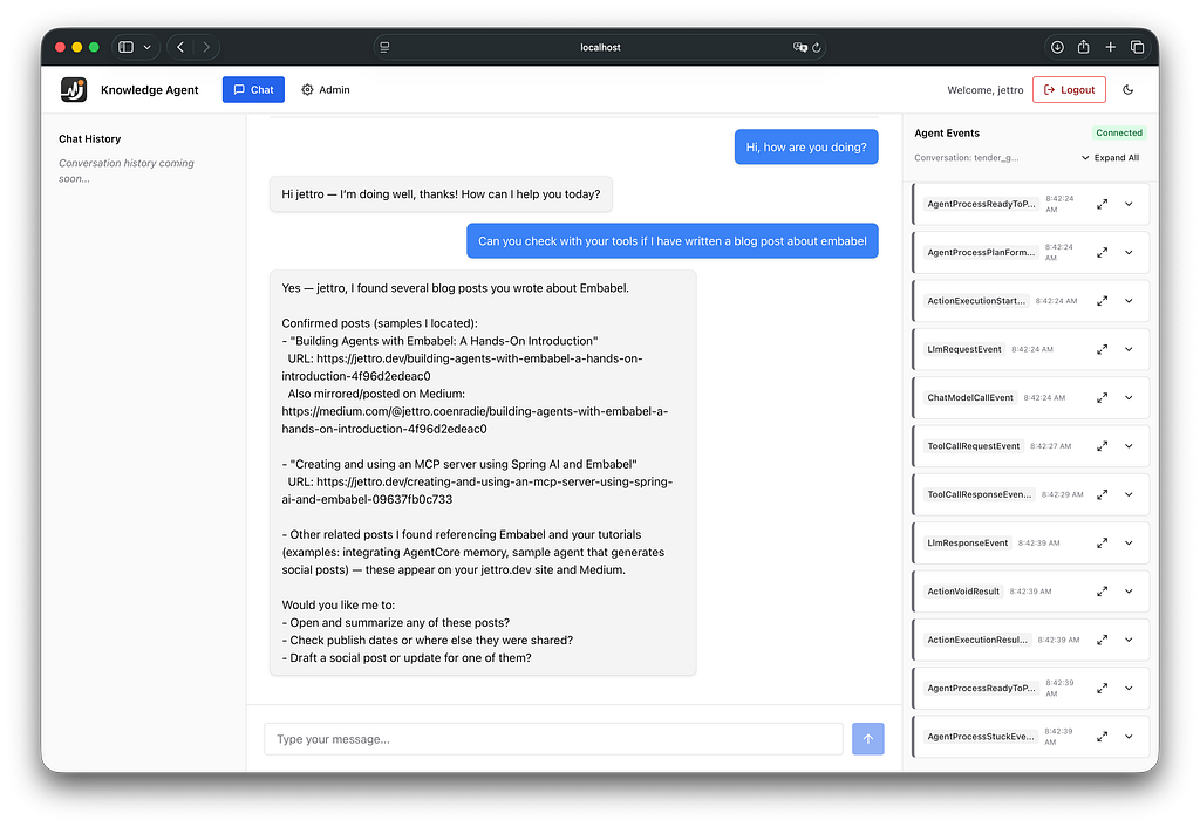

Before you think that AI Agents are all about chat, that is not my standpoint. Agents can be integrated into solutions like business processes, moderation, report generation, and code generation. Still, it’s nice to be able to communicate with an Agent through chat. Embabel supports chat in the latest versions (0.3.x). In this blog post, I show you how to work with the Embabel ChatBot in a web application. As a bonus, I also integrate the Agent event stream into the GUI. Perfect for understanding what happens inside the agent.
The screenshot below shows you what we are going to create.
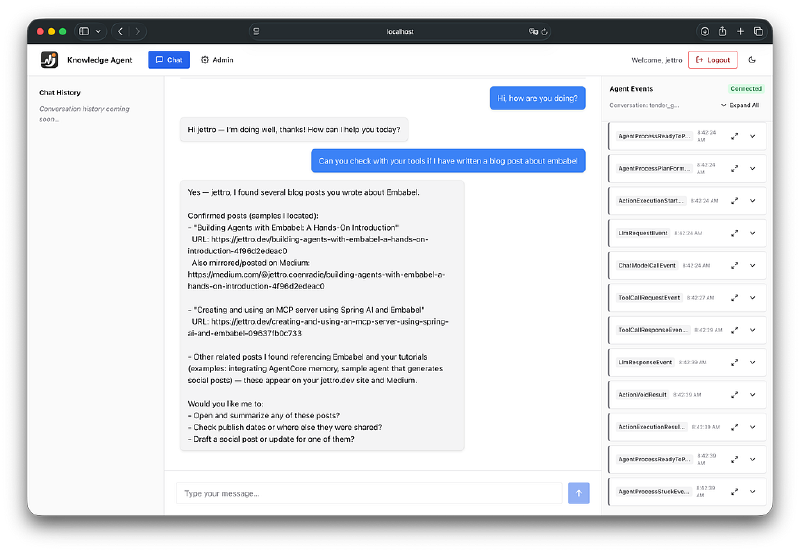
Screenshot of the chat GUI for an Embabel chat bot.
Introducing the sample#
In my previous blog, Agentic RAG with Embabel: A complete walkthrough, I present the sample application.
The sample application enables the Agent to search through some of my blogs. I included a Python script to extract the Markdown content of a blog item. The Agent runs in the Java backend and is exposed as a Spring MVC application. The frontend is a React application hosted by the Spring Boot project. The GUI components are built with Chakra UI.
Add RAG to the agent#
You can read about the RAG pipeline to extract content from blogs through a Python script and the ingest pipeline using the LuceneSearchOperations. A new ChunkTransformer is introduced in the latest SNAPSHOT (0.3.3-SNAPSHOT). The code below shows the implementation of the LuceneSearchOperations.
@Bean
LuceneSearchOperations luceneSearchOperations(ModelProvider modelProvider) {
    return LuceneSearchOperations
            .withName("sources")
            .withEmbeddingService(modelProvider.getEmbeddingService(DefaultModelSelectionCriteria.INSTANCE))
            .withChunkerConfig(new ContentChunker.Config(800,100, 100))
            .withChunkTransformer(AddTitlesChunkTransformer.INSTANCE)
            .withIndexPath(Path.of("./.lucene-index"))
            .buildAndLoadChunks();
}
Refer to the blog post mentioned for more information on the ingest pipeline.
Source code#
The project is available to you on GitHub.
GitHub - jettro/embabel-agent-rag-sample: A project demonstrating the embabel RAG implementation
The readme should be sufficient if you want to run the project yourself. Let me know if you run into problems.
SseEmitter for server-side events#
Embabel packages an interesting controller SseEmitter. At first, it got in the way when I was working with WebFlux. But in the end, I endedup using the SseEmitter myself as well.
In the React front end, we integrate this controller to receive agent events. This is the right bar in the GUI. You can learn a lot from these events. You can see the interaction with Tools, with the LLM, and see the progress of the actions to be used by the Agent. The next screen shows the UserMessage event. Later, in the video, I show you more events and what you can take from them.
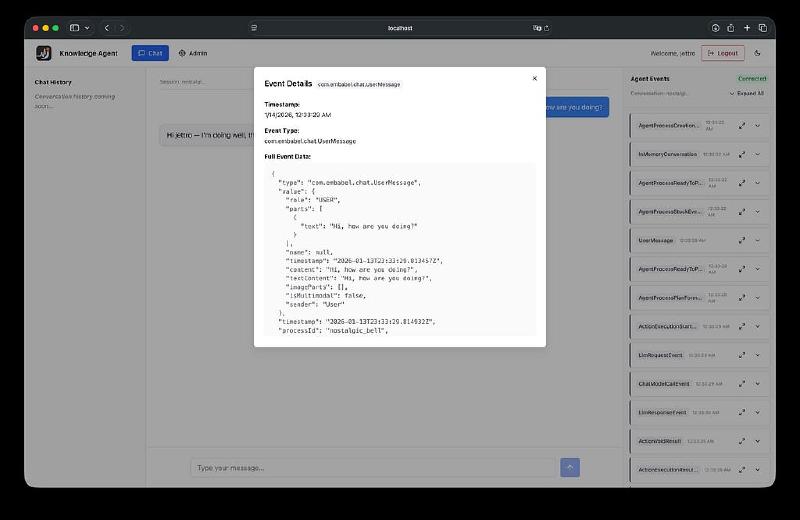
Shows part of the UserMessage event.
I do not want to dive into the React code. Remember that the Embabel runtime exposes this controller. The URL to call is: /events/process/{processId}. You do need to provide the processId of the agent you want to connect to. We return to this processId later in this post.
If you want to have a look at the code, look for the EventStream.tsx , and the useSSE.ts file.
Exposing the Embabel ChatBot#
Before I explain the code, I give you an overview of the components of the ChatBot solution.
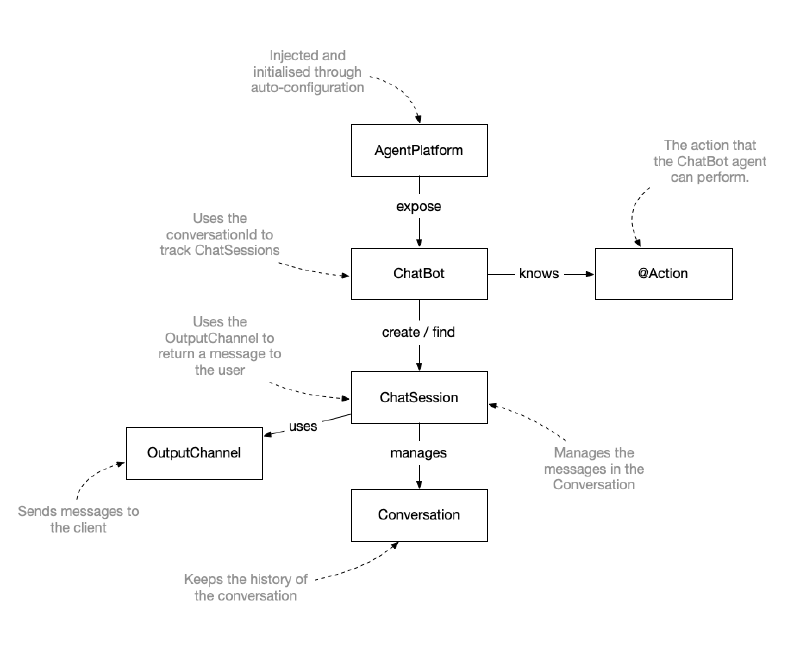
An overview of all the components in the Embabel ChatBot solution.
It is essential to understand that the ChatBot finds all Actions through the EmbabelComponent annotation. In Spring configuration, you create the ChatBot bean, and during this creation, the actions are found.
@Bean
Chatbot chatbot(AgentPlatform agentPlatform) {
    return AgentProcessChatbot.utilityFromPlatform(agentPlatform, new Verbosity().showPrompts());
}Actions#
The actions are what the ChatBot agent can do. They typically receive the Conversation and an ActionContext. This ActionContext is used to return a message to the user through the ChatSession and the OutputChannel.
After reviewing the code, you should notice that we only act if the last message is a user message. Also, notice that we obtain the OperationContext from the ActionContext. Next, everything is as before. Provide an LLM through a role, pass the ToolishRag to give the agent the capacity to find resources. In my case, I provide the logged-in user’s name to the LLM.
@EmbabelComponent
public class ChatActions {
    private static final Logger logger = LoggerFactory.getLogger(ChatActions.class);

    private final ToolishRag toolishRag;

    public ChatActions(SearchOperations searchOperations) {
        this.toolishRag = new ToolishRag(
                "sources",
                "sources for answering user questions",
                searchOperations);
    }

    @Action(canRerun = true, trigger = UserMessage.class)
    public void respond(Conversation conversation, ActionContext context) {
        String userName = SecurityContextHolder.getContext().getAuthentication().getName();
        var lastUserMessage = conversation.lastMessageIfBeFromUser();

        if (lastUserMessage != null) {
            logger.info("Received user message as last message: {}", lastUserMessage.getContent());
            var assistantMessage = context.ai()
                    .withLlmByRole(CHEAPEST.name())
                    .withReferences(toolishRag)
                    .withSystemPrompt("You are a helpful assistant. Answer questions concisely. Always address the current user by their name: " + userName + ".")
                    .respond(conversation.getMessages());
            context.sendMessage(conversation.addMessage(assistantMessage));
        } else {
            logger.info("Received non-user message");
        }
    }
}
Initialise the ChatSession#
To start sending messages to and receiving responses from the ChatBot, we need to obtain the ChatSession. The client provides a conversationId if it has one already. The InitSessionRequest can pass this conversationId. If the conversationId is not provided or is unknown, we create a new Session. If it is found, we return the existing ChatSession.
@PostMapping(value = "/init", consumes = "application/json")
public InitSessionResponse initialiseSession(@RequestBody InitSessionRequest request, Authentication authentication) {
    User user = getUser(authentication);
    logger.info("Received request to initialise session for user: {}", user.getId());

    ChatSession chatSession = createOrFetchSession(request.conversationId(), user);

    return new InitSessionResponse(chatSession.getConversation().getId());
}

@NotNull
private ChatSession createOrFetchSession(String conversationId, User user) {
    ChatSession chatSession;
    if (conversationId == null || conversationId.isEmpty()) {
        logger.info("Creating new conversation for user: {}", user.getDisplayName());
        chatSession = chatbot.createSession(user, new SseEmitterOutputChannel(), null);
    } else {
        logger.info("Fetching conversation for ID: {} for user: {}", conversationId, user.getDisplayName());
        chatSession = chatbot.findSession(conversationId);
        if (chatSession == null) {
            throw new IllegalArgumentException("Conversation not found for ID: " + conversationId);
        }
    }
    return chatSession;
}
The conversationId is returned to the client. With this conversationId and the initialised session, we can start the stream to receive events.
Start stream to receive response messages#
The OutputChannel is responsible for returning messages to the client. I wanted to stream these messages to the client and decided to use an SSE emitter to send them. If the stream is interrupted, we want to reconnect with the same conversationId (which equals the processId). The challenge in the current API is that you cannot change the OutputChannel. Therefore, we retrieve the OutputChannel from the ChatSession and set the current SseEmitter on it.
This is exactly what you find in the next code block.
@GetMapping(value = "/stream/{processId}")
public SseEmitter streamMessages(@PathVariable(name = "processId") String processId, Authentication authentication) {
    logger.info("Starting message streaming for process ID: {}", processId);

    var emitter = new SseEmitter(Long.MAX_VALUE);

    processEmitters.computeIfAbsent(processId, id -> new CopyOnWriteArrayList<>())
            .add(emitter);

    emitter.onCompletion(() -> processEmitters.get(processId).remove(emitter));
    emitter.onError(throwable -> processEmitters.get(processId).remove(emitter));
    emitter.onTimeout(() -> processEmitters.get(processId).remove(emitter));

    User user = getUser(authentication);

    var outputChannel = createOrFetchSession(processId, user).getOutputChannel();
    if (outputChannel instanceof SseEmitterOutputChannel sseEmitterOutputChannel) {
        sseEmitterOutputChannel.setEmitter(emitter, processId);
    } else {
        throw new IllegalStateException("Output channel is not a SseEmitterOutputChannel");
    }

    return emitter;
}
Sending events through the SseEmitterOutputChannel#
The next code block is substantial. First, we have a method to set the SseEmitter in the OutputChannel. On receiving the emitter, I always send back a confirmation message. This is the ConnectedOutputChannelEvent.
The other method is the send method called by the Embabel framework when it receives an event intended for the user. I wrap the event in a Builder to send it to the client via the SseEmitter.
/**
 * Implementation of {@link OutputChannel} that uses Spring's {@link SseEmitter} for Server-Sent Events (SSE).
 * <p>
 * When an emitter is set, it sends a {@code "Connected"} event indicating that the channel is ready
 * to receive events. On reconnecting a client, the OutputChannel can receive a new emitter.
 * </p>
 * <p>
 * Individual {@link OutputChannelEvent} instances are sent sequentially to the client.
 * </p>
 */
public class SseEmitterOutputChannel implements OutputChannel {
    private static final Logger logger = LoggerFactory.getLogger(SseEmitterOutputChannel.class);

    private SseEmitter emitter;

    /**
     * Sets the SSE emitter to use for sending events. The output channel can receive new  emitters.
     *
     * @param emitter The active Sse emitter for sending the events.
     */
    public void setEmitter(SseEmitter emitter, String processId) {
        logger.info("Setting emitter for process: {}", processId);
        this.emitter = emitter;

        // Create the connected event to send to the client
        var sseEvent = SseEmitter.event()
                .id(processId)
                .name("Connected")
                .data(new SseEmitterOutputChannel.ConnectedOutputChannelEvent(processId))
                .build();

        // Send the connected event to the client to let it know that the channel is ready
        try {
            emitter.send(sseEvent);
        } catch (IOException e) {
            throw new OutputChannelRuntimeException("Problem sending the sse stream connected event.", e);
        }
    }

    @Override
    public void send(@NotNull OutputChannelEvent event) {

        if (emitter == null) {
            logger.warn("No emitter set, dropping event: {}", event);
            return;
        }

        // Create the event to send to the client
        var sseEvent = SseEmitter.event()
                .id(event.getProcessId())
                .name(event.getClass().getSimpleName())
                .data(event)
                .build();

        // Send the event to the client
        try {
            emitter.send(sseEvent);
        } catch (IOException e) {
            logger.error("Error sending event to client for processId: {}", event.getProcessId(), e);
            throw new OutputChannelRuntimeException("Error sending event to client", e);
        }
    }

    /**
     * Event for notifying the client that the OutputChannel is ready to receive events.
     */
    public static class ConnectedOutputChannelEvent implements OutputChannelEvent {

        private final String processId;
        private final String message;

        public ConnectedOutputChannelEvent(String processId) {
            this.processId = processId;
            this.message = "Connected OutputChannel SSE Emitter";
        }

        @NotNull
        @Override
        public String getProcessId() {
            return this.processId;
        }

        @NotNull
        public String getMessage() {
            return this.message;
        }
    }
}
Receiving a UserMessage from the client#
Finally, we can receive a request to send a message. The Request object contains the message and the conversationId. Again, we need to obtain the ChatSession and call the onUserMessage method to send a message to the ChatBot.
The following code block shows how to receive a message from the user and send it to the ChatBot.
@PostMapping(value = "/message", consumes = "application/json")
public Response chat(@RequestBody Request request) {
    logger.info("Received message: {}", request.message());

    var conversationId = request.conversationId();

    // Load the ChatSession using the conversationId or create a new one
    ChatSession chatSession = chatbot.findSession(conversationId);
    if (chatSession == null) {
        throw new IllegalArgumentException("Conversation not found for ID: " + conversationId);
    }

    // Call the agent with the user message
    chatSession.onUserMessage(new UserMessage(request.message()));

    return new Response("You should receive a response soon", chatSession.getProcessId());
}
The demo plus explanation#
In the YouTube video, I show you the sample application. With the Agent events, I explain the steps that occur. I display the UserMessage, invoke the tools, interact with the LLM, and return a response.
https://medium.com/media/0631e40b31cb3339a95c624720392893/href