
Giving the case agent reusable tools#
In the previous episode, I gave the
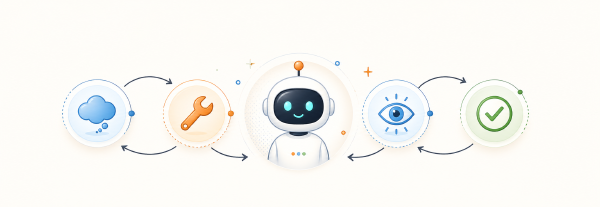
case-handling application a brain. akgentic-llm wrapped Pydantic AI in a provider-neutral
ReactAgent, ran the ReAct loop, enforced usage limits, and made model and tool calls visible. The
agent could already call a plain Python function, but that left an architectural question
unanswered: how do I turn tools into reusable capabilities without coupling them to one model, one
agent, or even one actor system?
That is the job of
akgentic-tool. It sits between the actor runtime and
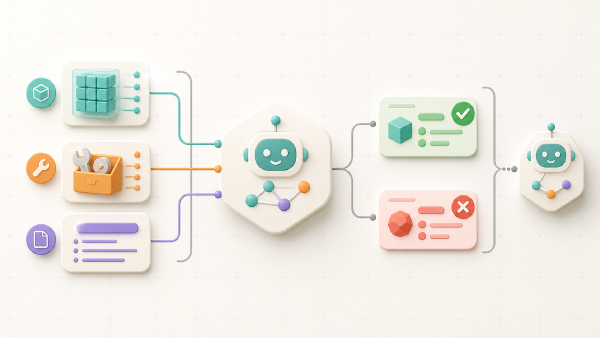
the LLM-powered agents running inside it. A capability can become an LLM tool call, prompt material,
structured per-turn context, or a command that another agent calls directly. The same package also
contains practical integrations for workspaces, planning, web search, team management, vector stores,
MCP servers, and sandboxed execution.
The design clicked for me when I stopped thinking of a tool as a Python function and started thinking of it as serializable capability configuration. The function is only one way to use that configuration at runtime.
In this fifth article in the series, I use two working samples from my
basic-akgents project:
- a custom
CaseLookupToolthat emits a domain event through a real observer; - an
MCPToolthat discovers and calls tools exposed by a FastMCP case server.
I then connect the observability concepts to the modules from the previous articles. There are two observer seams, but they converge on one event stream. Understanding that distinction helped me separate tool behaviour, LLM-loop telemetry, and team persistence instead of calling everything “logging”.
Install the capability layer#
The base package requires Python 3.12 or newer. Add it directly when you want to manage the module independently:
uv add "akgentic-tool"Optional extras enable the heavier integrations. For example, the Weaviate backend needs its own client:
uv add "akgentic-tool[weaviate]"The module documentation also lists extras for
vector search, document reading, and vision. If you prefer versions tested as one Akgents release,
the akgentic-framework meta-distribution pins
the package set:
pip install "akgentic-framework[tool]"My sample currently resolves akgentic-tool 1.7.0 alongside akgentic-core 1.5.12,
akgentic-llm 2.1.0, and akgentic-team 1.5.6. The project also installs FastMCP because it runs an
MCP server; the lightweight MCP client support used by the agent is not enough to host one.
The mental model: cards become tools, context, and commands#
The flow starts with one or more ToolCard configurations. The factory prepares these cards and
turns them into the different forms used by agents and humans:
flowchart TB
    CARDS["ToolCard configuration"]
    FACTORY["ToolFactory
orders cards and attaches observers"]
    OUTPUTS["Tools, prompts, context,
commands, and toolsets"]
    USERS["LLM agents, other agents,
and humans"]

    CARDS --> FACTORY
    FACTORY --> OUTPUTS
    OUTPUTS --> USERS
A ToolCard contains configuration and does not do anything by itself. ToolFactory orders a set of
cards, attaches the observer each card needs, and collects everything they provide. A card can
implement these hooks:
| Hook | Result | Used for |
|---|---|---|
get_tools() | Python callables | LLM tool calls inside the ReAct loop |
get_system_prompts() | prompt callables | stable instructions in the prompt prefix |
get_context_states() | context-state callables | structured, per-turn context deltas |
get_commands() | command-to-callable map | direct calls from agents or humans |
get_toolsets() | runtime toolsets | provider-managed sets such as MCP |
Most cards implement only a subset. That is an important property: one configuration abstraction can support a simple local function and a remotely discovered MCP toolset without pretending those two things have the same lifecycle.
A ToolCard must survive serialization#
ToolCard is a Pydantic model. It must round-trip through model_dump() and model_validate().
Normal fields therefore cannot hold an open connection, actor proxy, callback, or file handle.
Serializable configuration belongs in fields; runtime handles belong in PrivateAttr.
This restriction makes it possible to store, move, and restore agent and team configuration. The capability descriptions need to remain data. It is also why the observer is attached later instead of being stored as part of the card.
The tool function’s docstring deserves special attention. Pydantic AI turns it into the contract the model reads. A human-oriented implementation comment does not tell the model when to call the tool, what an argument means, or which failures it can correct. I write the docstring for the model as much as for the next developer.
Sample 1: build a custom case lookup tool#
The first sample lives in
work_with_tools.py.
Its card has one serializable setting and exposes one callable:
class CaseLookupTool(ToolCard):
    backend: str = "basic_akgents.case_repository.DummyCaseRepository"

    def get_tools(self) -> list[Callable[..., Any]]:
        backend = self.backend
        observer_or_none = self._observer_or_none

        def find_case_description(case_id: str) -> str:
            """Return the description of the support case with the given id.

            Args:
                case_id: The identifier of the case, for example `case_1`.
            """
            repository = build_case_repository(backend)
            try:
                case = repository.load_case(case_id)
            except CaseNotFoundError as exc:
                observer = observer_or_none()
                if observer is not None:
                    observer.notify_event(
                        CaseLookedUpEvent(case_id=case_id, found=False)
                    )
                raise RetriableError(str(exc)) from exc

            observer = observer_or_none()
            if observer is not None:
                observer.notify_event(
                    CaseLookedUpEvent(case_id=case_id, found=True)
                )
            return case.case_description

        return [find_case_description]
Two details are easy to overlook.
First, the closure captures _observer_or_none, not the observer object. A tool closure may outlive
its owning agent. Capturing the owner strongly would keep a stopped agent alive; asking the weak
accessor at call time either returns the active observer or None.
Second, the tool raises Akgents’ RetriableError, not Pydantic AI’s ModelRetry. That keeps the card
independent from the LLM library. The integration boundary translates the exception later.
Attach the observer and translate retries#
The standalone sample implements the smallest useful observer:
class LoggingToolObserver:
    def __init__(self) -> None:
        self.events: list[object] = []

    def notify_event(self, event: object) -> None:
        self.events.append(event)
        logger.info("observer received event: %r", event)
Structural typing makes this a ToolObserver: it has notify_event. It records every emitted event
and logs it, while providing none of the actor operations that this standalone tool does not need.
The factory performs the wiring:
observer = LoggingToolObserver()
factory = ToolFactory(
    tool_cards=[CaseLookupTool()],
    observer=observer,
    retry_exception=ModelRetry,
)

agent = ReactAgent(
    config=config,
    tools=factory.get_tools(),
)
ToolFactory first topologically sorts cards by depends_on. It then attaches the same observer in
dependency order and wraps every callable so RetriableError becomes the injected retry exception.
The card remains framework-agnostic while the ReactAgent receives ordinary callables.
Run the sample from the project root:
make toolsIn my run, the model called find_case_description for case_2. The observer received
CaseLookedUpEvent(case_id='case_2', found=True), and the second model call returned priority 1,
critical, for the department-wide mail outage. The output shows the complete path:
CaseLookupTool
  -> ToolFactory
  -> ReactAgent
  -> find_case_description("case_2")
  -> LoggingToolObserver.notify_event(...)
  -> final answer
The actual output is:
INFO:httpx:HTTP Request: POST https://api.openai.com/v1/chat/completions "HTTP/1.1 200 OK"
INFO:__main__:observer received event: CaseLookedUpEvent(case_id='case_2', found=True)
INFO:httpx:HTTP Request: POST https://api.openai.com/v1/chat/completions "HTTP/1.1 200 OK"

=== Agent answer ===
The priority of case_2 is 1 - critical.

Reason: The mail server being down for the entire department indicates a significant disruption to communication and operations, requiring immediate attention to restore functionality.

=== Events the observer saw ===
case_id='case_2' found=True
How the observer connects a tool to the runtime#
It took me some time to understand the role of the observer. By itself, a card only contains configuration and has no connection to the running system. During wiring, the factory hands the card the object that owns it. From that point on, the observer is the card’s only route back into the runtime.
The package exposes two general observer levels:
| Protocol | Adds | What a tool can do |
|---|---|---|
ToolObserver | notify_event(event) | publish a domain event, and nothing more |
ActorToolObserver | address, orchestrator, team, state, proxy_ask, proxy_tell | reach actors and persisted tool state |
Specialised tools can define narrower domain protocols beside their implementation. My rule is to
give a tool only the observer functionality it needs. A tool that only publishes events should use
ToolObserver; only tools that interact with actors or stored state need ActorToolObserver.
Inside a managed team, I do not create a separate observer object. A BaseAgent is already an
ActorToolObserver, so it passes self into ToolFactory. In a standalone ReactAgent, like this
sample, I provide a small observer or omit it when the cards need none.
Why this is not a circular dependency#
At first sight the wiring looks circular: the agent contains a ReactAgent; the ReactAgent needs
tools; the tools need an observer; and the observer is the agent. Time order and reference ownership
remove that cycle:
- The actor already exists and already implements the observer protocol.
- During
on_start, it creates aToolFactoryand passesself. - The factory attaches a weak reference to each card.
- The actor creates its inner
ReactAgentfrom the factory’s callables and toolsets.
The ReactAgent owns tool callables, but a callable does not own the actor. The only back-reference is
weak. Calling a tool after its owner has stopped therefore raises ToolObserverGone instead of
leaking the stopped agent.
One subtle API rule follows from this design: a custom card should not narrow the public
observer() parameter to ActorToolObserver. The factory applies one observer uniformly to every
card. Keep the base ToolObserver signature and narrow inside a private accessor when a specific
tool needs the richer protocol.
Four channels, one capability description#
The current package exposes four Channels values. A BaseToolParam selects where its capability
appears:
| Channel | Consumer | Behaviour |
|---|---|---|
TOOL_CALL | LLM | the model chooses the callable during its ReAct loop |
SYSTEM_PROMPT | LLM context | stable guidance enters the cached prompt prefix |
LLM_CONTEXT | LLM context | structured state is appended for the current turn |
COMMAND | agents or humans | code invokes the capability directly |
This lets one domain capability serve different consumers. Planning information might be context for
the model and a direct command for an operator. A mutation might be an LLM tool call and an internal
command. The ToolCard remains the single configuration source.
Declaring a channel does not make a card implement it. If the matching card hook returns nothing, the
capability is silently absent. Tests should inspect the actual tool, prompt, context, and command
collections rather than trusting only the expose declaration.
Sample 2: expose the case repository through MCP#
The first sample produces local Python callables. MCP is different: the schemas and implementations
live on a server and are discovered at runtime. MCPTool therefore contributes through
get_toolsets(), never through get_tools().
The sample server in
case_mcp_server.py
wraps the same case repository used by the other episodes. It exposes three thin tools:
list_casesreturns the available cases;get_caseloads one case by id;set_case_priorityvalidates and records a priority.
FastMCP serves them over streamable HTTP at /mcp:
mcp.run(transport="http", host="127.0.0.1", port=8000)The client in
work_with_mcp_tools.py
needs only serializable connection configuration:
connection = MCPHTTPConnectionConfig(
    url="http://localhost:8000/mcp",
)
factory = ToolFactory(
    tool_cards=[MCPTool(connection=connection)],
)
agent = ReactAgent(
    config=config,
    toolsets=factory.get_toolsets(),
)
An all-MCP factory needs no tool observer. The card does not act on the actor system during wiring; Pydantic AI discovers and dispatches the remote tools when the agent runs.
Use two terminals:
# Terminal 1
make mcp-server

# Terminal 2
make tools-mcp
My client run connected to the local FastMCP server, made three model requests, discovered the repository tools, and recorded priorities. It also showed why giving a model a mutation tool is not the same as defining an authorization policy. The prompt asked it to select one case, but the model updated two eligible cases. Tool schemas help a model call code correctly; they do not guarantee that a probabilistic model follows a business invariant.
For a production mutation I would enforce “exactly one” outside the prompt: narrow the tool surface, validate a proposed command, require approval, or put the invariant in deterministic application code. Observability tells me what happened; it does not prevent the side effect.
MCP connection options#
MCPHTTPConnectionConfig supports streamable HTTP and SSE. The transport is explicit; an /sse URL
does not select SSE on its own. A bearer token, timeouts, and a tool_prefix can also be configured.
The prefix is useful when two servers expose the same tool name.
For a local subprocess, use MCPStdioConnectionConfig with a command such as uvx, npx, or
docker. The module also provides connection probing and tool-listing helpers, which are a better
first diagnostic than asking the model to “try again” when discovery fails.
Observability: two observers, one event stream#
“Add logging” is too vague for an agent system. I need to distinguish the behaviour of a tool from the behaviour of the model loop that decides to call it. Akgents has two observer seams for those two questions.
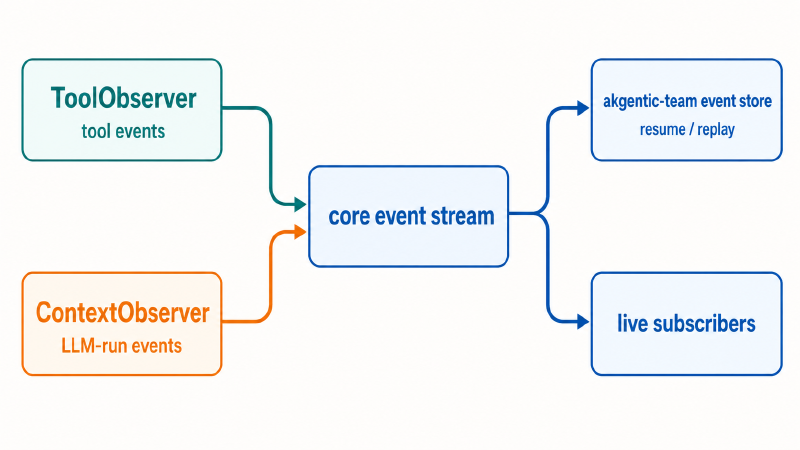
Tool events and LLM-run events describe different parts of a run, but both become part of the same observable history.
1. ToolObserver: what the capability does to the system#
ToolObserver and its richer ActorToolObserver belong to akgentic-tool. A tool uses
notify_event(event) to publish a domain event. For a stateful tool, that can be a ToolStateEvent
describing a delta: entities added to a knowledge graph, a planning item changed, or another tool
state transition.
The observer is more than a passive logger. Inside a team, the owning BaseAgent routes the event to
the orchestrator’s event stream. A standalone observer may instead record it, send it to telemetry,
or expose it to a test—as LoggingToolObserver does in the first sample.
The module deliberately publishes deltas rather than complete snapshots for each change. A state-change event carries the tool id, a per-tool sequence number, and a serializable payload. Empty deltas produce no event, and the sequence advances only when something is emitted. A consumer can therefore spot a gap instead of filtering artificial no-op events.
2. ContextObserver: what happens inside the LLM run#
ContextObserver belongs to akgentic-llm and is passed to ReactAgent(observer=...). It observes
model requests and tool-call activity inside the ReAct loop. This is where request, response,
ToolCallEvent, and ToolReturnEvent information belongs.
That package boundary matters. The fact that a model called a tool is LLM-loop telemetry. The
domain event the tool emits because it changed something is tool behaviour. This distinction is
also visible in the package structure: tool-call events belong to akgentic.llm.event.
Consider set_case_priority:
ContextObserver                          ToolObserver
-----------------                        ------------
model requested set_case_priority  --->  case priority changed
tool returned updated case         <---  domain event published
The left side explains the model’s decision and call. The right side explains the system mutation. For a reliable audit trail I often want both, correlated by the surrounding message and team run.
The shared event stream makes replay more than a debugging feature#
In a BaseAgent, both observer paths publish onto the orchestrator event stream from
akgentic-core. That one stream has two main consumers:
akgentic-teampersists it with the team history, enabling resume and replay;- subscribers such as a human proxy, frontend, or local event tap consume it as a live view.
Stateful tool events do not need a separate late-join snapshot protocol. A subscriber rebuilds the tool’s visible state by replaying ordered deltas from team history. The actor’s own persisted state restores execution; the events reconstruct what observers need to see. Those are related, but not identical, responsibilities.
This is the observability model that you can expect from the framework:
- follow
ContextObserverto explain model requests, token usage, and tool calls; - follow
ToolObserverto explain domain events and capability state changes; - follow the core event stream to understand the team conversation over time;
- use the team store to resume or replay the run;
- attach live subscribers when a person or UI needs to watch it unfold.
Positioning the modules discussed so far#
To understand where akgentic-tool fits, it helps to look at the responsibilities of the different
Akgents packages:
| Package | Responsibility | Depends on |
|---|---|---|
akgentic-core | actor runtime, messages, orchestrator, and shared event stream | — |
akgentic-llm | ReactAgent, model providers, usage limits, compaction, and LLM-run observability | — |
akgentic-tool | capability cards, factory, channels, observer protocols, and domain tools | core |
akgentic-team | team lifecycle, event sourcing, persistence, archive, and resume | core |
akgentic-agent | BaseAgent, which composes core, LLM, and tools with typed routing | core, llm, tool |
akgentic-catalog | configuration registry for teams | core, llm, tool, team |
akgentic-infra | deployment backend and service tiers | the packages above |
The dependency lines reveal two valuable seams. akgentic-llm depends on neither core nor tool, so
the previous article’s standalone ReactAgent
could run with plain callables and no actor system. akgentic-tool depends on core but not on the LLM
package, so tool code raises RetriableError and lets the integration layer translate it.
akgentic-agent is the composition point:
flowchart TB
    CORE["akgentic-core
actors, messages, event stream"]
    TOOL["akgentic-tool
capability cards and observers"]
    LLM["akgentic-llm
ReactAgent and model loop"]
    AGENT["akgentic-agent
BaseAgent"]
    TEAM["akgentic-team
history, resume, replay"]

    CORE --> AGENT
    TOOL --> AGENT
    LLM --> AGENT
    AGENT --> TEAM
    CORE --> TEAM
A BaseAgent is an Akgent and an ActorToolObserver. It builds a ToolFactory, turns cards into
tools and toolsets, and gives those to its inner ReactAgent. When it receives an AgentMessage, the
LLM drives the next conversation step, tools give it hands, and the core moves typed messages between
actors. Team persistence records the event stream so that work can be inspected, replayed, and
resumed.
The series now contains these steps:
akgentic-coregave the application actors, messages, state, and orchestration.akgentic-teammade the actor tree a persistent, resumable team.- Pydantic AI exposed the typed model, dependency, output, capability, and MCP foundations.
akgentic-llmadded the model brain and a visible ReAct loop.akgentic-toolnow turns reusable configuration into the hands, context, and commands that let an agent act.
What I take away#
akgentic-tool does more than register functions with an LLM. It keeps capability configuration
serializable, separates runtime wiring from stored data, lets one capability surface through several
channels, and makes actor access explicit through observer protocols.
The custom card demonstrates the smallest complete path: configuration becomes a callable, the factory injects observation and retry behaviour, the model calls the tool, and a domain event proves what happened. MCP demonstrates the other end of the spectrum: the card contributes a remotely discovered toolset without needing an actor observer at all.
The observability design connects both samples to the rest of Akgents. LLM-run events show what
happens in the model loop, while tool events show the domain behaviour. The core event stream carries
both, and akgentic-team turns that stream into durable history. With those boundaries clear, I can
add more powerful tools without hiding their side effects or coupling them to one agent
implementation.