Giving the case agent a brain#
The first two articles in this series stayed inside Akgents. I started with the actor-based core and
then made the team durable with akgentic-team. In the third
article, I stepped down a layer to
learn the Pydantic AI foundation underneath the framework. Now those paths meet: it is time to give
the case-handling application an LLM.
The module for that job is
akgentic-llm. It sits between application code and
Pydantic AI. The module gives me a provider-neutral ReactAgent, configuration for models and
budgets, persistent conversation context, prompt utilities, retry behaviour, cost data, and seams
for observing or changing the run loop.
One architectural detail immediately appealed to me: akgentic-llm does not depend on
akgentic-core, akgentic-team, or the other Akgents packages. I can learn and use this layer on its
own. The ReactAgent in this article is therefore not an Akgents actor. It is a focused LLM wrapper
that I can later place behind one of the actors from the earlier episodes.
The runnable code lives in the
blog_part_3 branch of the basic-akgents repository.
This article is part 4 of the series, but the branch is part 3 of that repository’s evolution because
the Pydantic AI interlude used a separate sample project.
One module, six providers#
Applications easily become coupled to a model API. Provider-specific model names, settings, result
types, and retry behaviour leak through the code until changing providers means changing the
application. akgentic-llm puts a consistent surface in front of six provider families: OpenAI,
Azure OpenAI, Anthropic, Google, Mistral, and NVIDIA.
That boundary also stops Pydantic AI types from spreading through the higher Akgents layers. Pydantic AI still performs the model run underneath, but application code works primarily with the Akgents configuration and agent API. This is the same kind of separation I valued in the earlier articles: framework mechanics stay behind an explicit boundary instead of becoming everybody’s concern.
The package can be installed by itself:
uv add akgentic-llmWhen I want the versions of the modules that the Akgents maintainers tested together, I can install it through the framework bundle:
uv add "akgentic-framework[llm]"The sample currently locks akgentic-llm 2.1.0 and Pydantic AI 2.31.1. That matters for this
article, because both APIs are moving quickly. Examples describing provider behaviour should always
be read together with their package versions.
Start with one model call#
The smallest useful setup needs a ModelConfig, a ReactAgentConfig, and a ReactAgent:
from akgentic.llm import ModelConfig, ReactAgent, ReactAgentConfig
from dotenv import load_dotenv

config = ReactAgentConfig(
    model_cfg=ModelConfig(provider="openai", model="gpt-4o-mini")
)

if __name__ == "__main__":
    load_dotenv()
    agent = ReactAgent(config=config)
    result = agent.run_sync(
        "Determine the priority of this case: "
        "The printer on the second floor is not working."
    )
    print(result)
ModelConfig is more than a model name. It can hold a temperature and seed when the provider
supports them, an output-token limit, the context length, a reasoning effort, and fallback models.
The provider factory translates those common settings into the model implementation Pydantic AI
needs.
The module also supplies an HTTP client with retry behaviour. Transient server failures and rate
limits are retried with backoff, jitter, and support for a Retry-After header, while most other 4xx
responses fail immediately. That is a small detail in a demo and an important one in a running
application.
ReAct: reasoning followed by action#
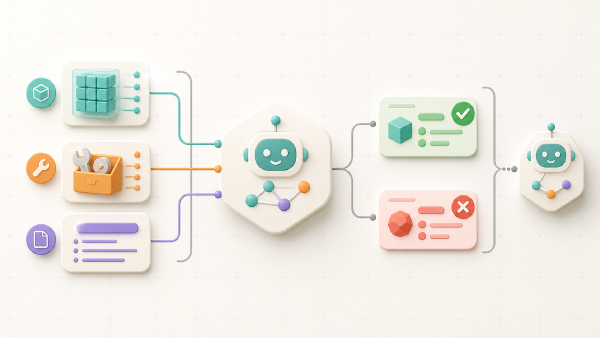
Before agents became commonplace, “React” usually meant the user-interface library. In an agent context, ReAct combines reasoning and acting. The application gives the model a task and a set of tools. The model can return a final answer, or ask the application to execute a tool. The tool result becomes part of the conversation and the model gets another turn.

That loop is why the class is called ReactAgent. My Python function remains ordinary application
code:
def find_case_description(case_id: str) -> str:
    """Return the description for an existing case id."""
    if not case_id or case_id != "case_1":
        raise ValueError("Need an existing case id to fetch it.")
    return "The printer on the second floor is not working"
I hand the function to the agent and tell the model when it should use it:
agent = ReactAgent(
    config=config,
    tools=[find_case_description],
)

result = agent.run_sync(
    "Determine the priority of the case. "
    "Use a tool to find the case description. "
    "Extract the case_id from the question. "
    "Return the priority and explain your reason. "
    "The case id is case_1."
)
The docstring is part of the tool contract. Pydantic AI derives a schema from the function signature, offers that schema to the model, validates the arguments the model returns, executes the function, and feeds its result into the next model request. I do not write the loop myself, but I still own the tool and its domain boundary.
A current OpenAI compatibility trap#
Adding that first tool was not as effortless as the code suggests. With a newer reasoning model I
received an HTTP 400 response. The same example worked when I changed the model to gpt-4o-mini.
That difference led to
akgentic-llm issue #135.
The issue describes two interactions in the OpenAI Chat Completions path used by the current module:
- Native structured output adds a JSON-schema response format to a request that also contains tools.
- Newer reasoning models require a compatible reasoning setting when tools are sent through Chat
Completions, while the module’s configuration does not currently expose the required
nonevalue.
The proposed fix is
pull request #136. It changes the default
openai and azure providers to Pydantic AI’s Responses API models. The previous Chat Completions
behaviour remains available through explicit openai-chat and azure-chat provider names.
As of 31 August 2026, both the issue and the pull request are still open. I therefore keep the sample
on gpt-4o-mini; the successful output later in this article comes from that configuration. I do not
present the pull request as released behaviour. When it lands, check its final provider names and
the released package version before copying the migration advice.
This experience is also a useful reminder about abstraction layers. A provider abstraction removes API details from my application, but it cannot make differences between provider APIs disappear. The layer still has to choose the correct underlying transport for a model’s features.
Put a budget around the loop#
A ReAct loop can make several model requests and several tool calls for one application request. If the model keeps trying without reaching a conclusion, the cost and latency continue to grow. The module separates limits for one run from limits for the complete lifetime of an agent:
from akgentic.llm import AgentUsageLimits, RunUsageLimits

config = ReactAgentConfig(
    model_cfg=ModelConfig(provider="openai", model="gpt-4o-mini"),
    run_usage_limits=RunUsageLimits(
        run_request_limit=10,
        tool_calls_limit=5,
    ),
    agent_usage_limits=AgentUsageLimits(
        input_tokens_limit=1_000,
        output_tokens_limit=1_000,
        total_tokens_limit=10_000,
    ),
)
run_usage_limits resets for each call to run() or run_sync(). It is the brake on one loop:
requests, tool calls, and tokens consumed while solving one task. agent_usage_limits accumulates
across calls and protects the whole lifetime of that ReactAgent instance.
Very small limits do not automatically make an agent safer. They can also prevent it from completing a legitimate tool round-trip. A request limit of one, for example, allows the model to select a tool but leaves no request for interpreting the returned data. I treat these settings as operational budgets that need realistic measurements, not arbitrary low numbers.
The module distinguishes run-level and agent-level limit errors. A current run-level breach can be recovered by asking the model for one tool-free conclusion, while an exhausted lifetime budget is terminal for that agent. This is another reason to read the documentation for the exact version in use: budget recovery affects what the caller receives and how many lifetime runs a recovered turn consumes.
Track usage as data and cost#
Token counts are useful, but cost is easier to discuss with a product owner. akgentic-llm depends
on genai-prices, which maps provider usage data and
model identifiers to price information.
When I already have a raw provider response, I can extract its usage and calculate the price:
from genai_prices import extract_usage

usage = extract_usage(response_data, provider_id="openai", api_flavor="chat")
price = usage.calc_price()
print(price.total_price)
The pricing data can be updated independently. That is important because a hard-coded price table ages much faster than the application around it:
from genai_prices import UpdatePrices, Usage, calc_price

updates = UpdatePrices()
updates.start(wait=True)
price = calc_price(Usage(input_tokens=123, output_tokens=456), "gpt-5")
print(price)
updates.stop()
Price prediction remains an estimate based on the recorded usage and the available price data, but it turns the vague instruction “keep the agent cheap” into something I can observe and aggregate.
Capabilities: hooks into the run#
Wrapping a framework method every time I need tracing, steering, or recovery quickly becomes brittle.
Pydantic AI capabilities offer hooks at defined points of a run, and ReactAgent exposes them through
its capabilities argument.
The module mounts its own capabilities first. In the version used by the sample, the order is:
LifetimeBudgetCapability
CompactionCapability
EventSourcingCapability
LimitRecoveryCapability
HealingCapability
your capabilities...
Before-hooks run in that order and after-hooks run in reverse. The first capability is therefore the outermost wrapper. My additions operate inside the module’s budgeting, compaction, persistence, recovery, and healing behaviour.
Steer every request with one source of truth#
The case domain already defines one priority scale. I do not want to duplicate that scale in every
user prompt, so CasePriorityCapability injects it before each model request:
@dataclass
class CasePriorityCapability(AbstractCapability[Any]):
    guidance: str = PRIORITY_GUIDANCE

    async def before_model_request(
        self,
        ctx: RunContext[Any],
        request_context: ModelRequestContext,
    ) -> ModelRequestContext:
        messages = request_context.messages
        if messages and self._is_guidance(messages[0]):
            return request_context

        request_context.messages = [
            ModelRequest(parts=[UserPromptPart(content=self.guidance)]),
            *messages,
        ]
        return request_context
The guard matters. before_model_request runs on every trip around the loop, not once for the complete
run. Without the check, the second model request would receive two priority blocks, the third would
receive three, and the context would keep growing with accidental duplicates.
I prepend the stable block instead of appending it. This keeps the domain guidance ahead of the case text and in the same position as the conversation grows. That stable prefix is also friendlier to provider prompt caching.
Mounting the capability is an ordinary constructor choice:
agent = ReactAgent(
    config=config,
    tools=[find_case_description],
    capabilities=[CasePriorityCapability()],
)
Observability: data versus control flow#
“Add logging” is not yet an observability design. I first need to decide what I want to see.
Logging inside find_case_description only shows code that I own. A ContextManager observer sees
the data produced by the run: LLM messages, tool calls, tool returns, usage, and cost-related events.
A capability sees the control flow: graph nodes, exact request history, tool argument processing,
retries, and failures.
The sample’s ObservabilityCapability implements the hooks without changing their inputs or
outputs. Mounted beside the priority capability, it makes the ReAct loop visible:
agent = ReactAgent(
    config=config,
    tools=[find_case_description],
    capabilities=[
        ObservabilityCapability(),
        CasePriorityCapability(),
    ],
)
The three node types in its trace are the loop:
UserPromptNode -> ModelRequestNode -> CallToolsNode
                         ^                 |
                         |_________________|
UserPromptNode seeds the run. ModelRequestNode asks the model what to do. CallToolsNode executes
the requested tool and sends the result back towards another model request. When the model returns
text instead of another tool call, the final CallToolsNode has nothing to execute and transitions
to End.
This distinction helps me choose the lightest useful instrument. I subscribe an observer when I need an audit trail of messages, tools, tokens, or costs. I add a capability when I need to understand or change how the loop itself executes.
Keep the conversation, then compact it#
The model does not remember earlier calls by itself. ContextManager owns the conversation history
that ReactAgent passes into later runs. It records the messages emitted by the event-sourcing
capability and can apply a sliding window while preserving system messages.
Long-running conversations eventually need more than a fixed window. To trigger summarisation when the history approaches the model’s context length, both sides of the threshold must be configured:
from akgentic.llm import CompactionConfig

config = ReactAgentConfig(
    model_cfg=ModelConfig(
        provider="openai",
        model="gpt-4o-mini",
        context_length=128_000,
    ),
    compaction_cfg=CompactionConfig(
        strategy="summarize",
        auto_trigger=True,
        trigger_ratio=0.85,
        summary_target_tokens=2_000,
    ),
)
The context_length is essential when automatic compaction is usage-based; without a context budget
there is no threshold to calculate. The runnable file currently defines compaction_cfg but leaves
context_length unset, so its automatic trigger is effectively off. The complete configuration
above arms it at 85 percent. When it fires, the compaction capability replaces older history with a
summary before the next run reads it, and a LlmContextCompactedEvent makes that change visible to
observers.
Summarisation trades detail for space. I would not treat a compacted conversation as a perfect audit record. Business facts that must remain exact belong in application state or an event store, while conversation compaction keeps the model supplied with useful working context.
Dynamic system prompts#
Some instructions are static in purpose but dynamic in content. The current time is the obvious example. The module includes dynamic prompts for the current date and time and for reminding a model to return JSON:
from akgentic.llm import current_datetime_prompt, json_output_reminder_prompt

agent.system_prompt(current_datetime_prompt)
agent.system_prompt(json_output_reminder_prompt)
I can register my own function through the same system_prompt method. Dynamic system prompts are
rendered for a run and remain separate from ordinary conversation messages. They therefore survive
history compaction rather than being dropped as if they were an old user message.
The JSON reminder changes the shape of the final answer in this sample. It does not replace a typed output contract when my application needs validation, but it is useful when I want a plain-string agent to produce a predictable representation.
Run the complete example#
After cloning the companion repository and checking out the article branch, restore the locked environment and run the module:
git clone https://github.com/jettro/basic-akgents.git
cd basic-akgents
git checkout blog_part_3
uv sync
uv run src/basic_akgents/react_case_agent.py
I ran that exact Python file with the locked environment and an OpenAI API key. The trace below is shortened to the transitions that explain the behaviour:
┌─ wrap_run (head): entering the loop
│  before_run: a run is starting
│    before_node_run: UserPromptNode
│    after_node_run:  UserPromptNode -> ModelRequestNode
│      → before_model_request #1: sending 1 message(s) to the model
│      ← after_model_request #1: 1 tool call(s): find_case_description
│        ⚙ before_tool_execute: find_case_description({'case_id': 'case_1'})
│        ⚙ after_tool_execute:  find_case_description -> 'The printer on the second floor is not working'
│      → before_model_request #2: sending 4 message(s) to the model
│      ← after_model_request #2: text (the loop will end)
│    after_node_run:  CallToolsNode -> End
└─ wrap_run (finally): loop finished in 2.387s
   after_run: result produced (after wrap_run returned)
The second request contains four messages, not three, because the priority capability added its guidance ahead of the user prompt, tool call, and tool result. The final answer is the JSON requested by the dynamic system prompt:
{"priority":4,"justification":"The printer on the second floor is not working, which is a low-impact issue compared to critical or urgent situations."}Model output is not deterministic, so your wording can differ. The important behaviour is the same:
the model extracts case_1, asks for the tool, observes the description, assigns one priority using
the shared scale, and stops the loop with an answer.
What I take into the next layer#
akgentic-llm gives me more than a convenient model call. It provides a boundary around providers,
a ReAct loop with tools, two levels of usage budgets, persistent and compactable context, cost data,
dynamic prompts, and capability hooks for both steering and diagnosis.
The compatibility problem also taught me something useful about the maturity of an abstraction. The public API can remain stable while the implementation underneath must move from Chat Completions to Responses to support a newer combination of reasoning, tools, and structured output. Until the open fix is released, pinning versions and recording a known-working model is part of making the example reproducible.
The ReactAgent is deliberately independent from the actor framework. The next design step is not
to turn it into a subclass of an Akgents actor, but to compose it into an agent that already has an
address, state, messages, and a lifecycle. That keeps the brain replaceable and the team architecture
clear—the same separation of concerns that has guided the series from the start.